typescript
Why should we use TypeScript?
TypeScript makes code easier to read.
- By explicitly annotating types for variables, return values, interfaces, and so on, the code becomes easier to understand. TypeScript reduces developer mistakes.
- It's easy to catch errors while writing code or during the compile step.
- You can respond to errors quickly and minimize side effects. Make more active use of the IDE (autocompletion, type checking)
- With TypeScript, autocompletion works remarkably well.
- When calling a function, you can tell what parameters it requires and what value it returns without having to open the code separately.
- For React components, you can know the props/state values in advance. Support for object-oriented programming
- Powerful object-oriented programming support such as interfaces, generics, and overloading/overriding makes it easy to structure the codebase of large, complex projects.
TypeScript directory structure
┣ components
 ┃ ┣ types // types folder when defining types for multiple components,
 ┃ ┃ ┗ todos.ts
 ┃ ┗ TodosContentItemComponent.tsx // if it's limited to a component, declare it in the Component itself.
 ┣ containers
 ┃ ┣ types // types folder when defining types for multiple containers
 ┃ ┃ ┗ todos.ts
 ┃ ┣ RootContainer.tsx
 ┃ ┗ TodoContentContainer.tsx // if it's limited to a container, declare it in the Container itself.
 ┣ services
 ┃ ┣ __test__
 ┃ ┃ ┗ todo.service.tsx
 ┃ ┗ index.jsx
 ┣ states
 ┃ ┣ constants
 ┃ ┃ ┗ index.ts
 ┃ ┣ features
 ┃ ┃ ┣ __test__
 ┃ ┃ ┃ ┗ Todo.test.tsx
 ┃ ┃ ┗ index.ts
 ┃ ┣ store
 ┃ ┃ ┗ index.ts
 ┃ ┗ types // state types folder
 ┃ ┃ ┗ index.ts
 ┗ types
 ┃ ┗ index.ts // root path types folder
Reference pages
- https://github.com/react-hook-form/react-hook-form/tree/master/src/types
- https://github.com/mobxjs/mobx/blob/main/packages/mobx/flow-typed/mobx.js
interface vs type
// type
(O) export type PrimitiveType = string | number | boolean | undefined | null | symbol;
(X) export type SomeMembmerType = {
  name: string;
  age: number;
  address: string;
  tier: string;
};

-----------------------------------------

// interface
(O) export interface ISomeMemberInterface {
  name: string;
  age: number;
  address: string;
  tier: string;
}- Let's decide when to use type versus interface!!
- The latest version of tslint provides a guide for this.
- Use an interface instead of a type literal.tslint(interface-over-type-literal)
- A guide was added recommending that you use type only for literal types and use interfaces for Object-shaped types.
- Use an interface instead of a type literal.tslint(interface-over-type-literal)
- Let's use interfaces for everything except literal types (i.e., primitive types, custom values).
- Reference page: https://luckyyowu.tistory.com/401
- The latest version of tslint provides a guide for this.
Similarities
- Named types are used the same way for both Type and Interface
- Index signatures can be used
- Function types can be declared
- Generics can be used
- Both can be extended
- interface extends with the extends keyword, while type extends with &
Differences
-
Union types
- Possible with Type, but not with Interface
- type yesOrNo = ‘yes’ | ‘no’
- You cannot extend a union type with an interface
- Possible with Type, but not with Interface
-
Tuple and array types
- type: easy to use and convenient to extend; interface: somewhat complicated and inconvenient
type Pair = [number, number]; type StringList = string[]; type NamedNums = [string, …number[]] interface Tuple { 0: number; 1: number; length: 2; } const t: Tuple =[10,20] -
Augmentation feature:
- A feature available only in interfaces, allowing you to add properties.
interface IState {
  name: string;
  capital: string;
}
interface IState {
  population: number;
}
// doing this makes it include all three: name, capital, and population
React.FC vs Function Component
interface Props {
  name: string;
}

// React.FC(0)
// defaultprops does not work(
const PrintName: React.FC<Props> = ({ name = '' }) => {
  return (
    <div>
      <p style={ fontWeight: props.priority ? 'bold' : 'normal' }>{name}</p>
    </div>
  );
};

// React function
const PrintName2 = ({ name }: Props) => {
  return (
    <div>
      <p style={ fontWeight: props.priority ? 'bold' : 'normal' }>{name}</p>
    </div>
  );
};

PrintName2.defaultProps = {
  name: '',
};
Pros and cons of React.FC
- Pros
- props includes children by default
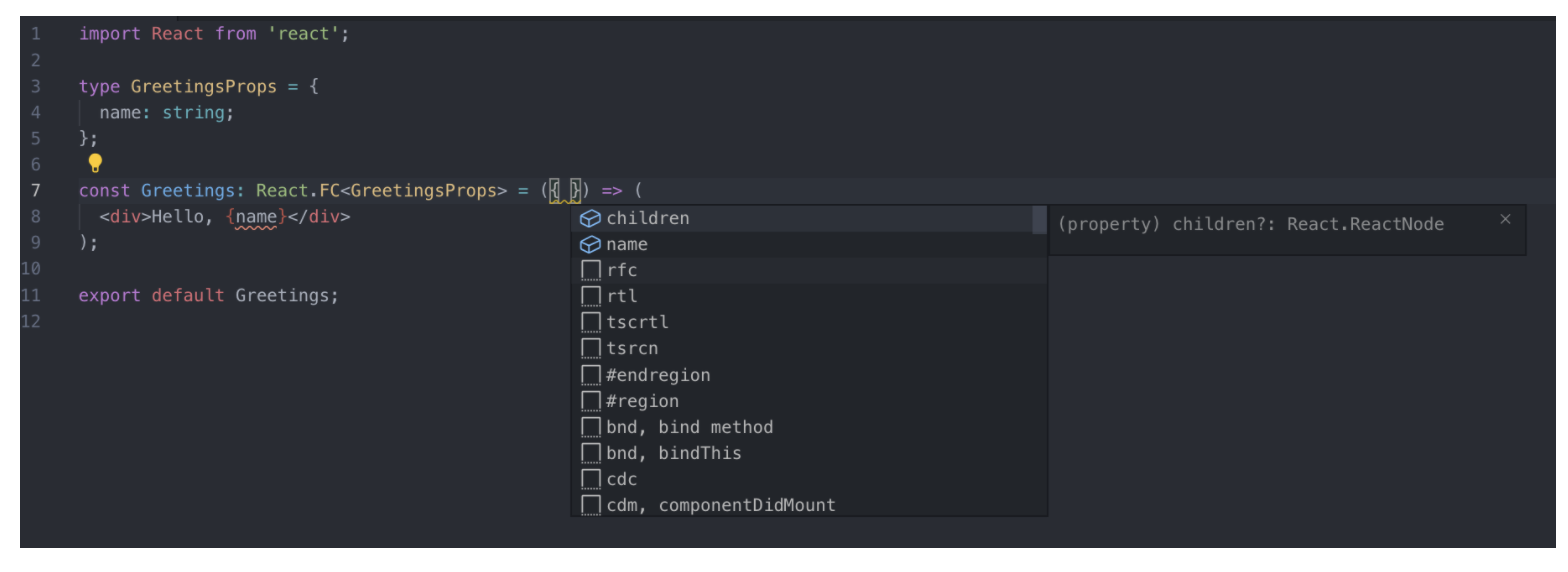
- You get autocompletion when setting defaultProps, propTypes, and contextTypes
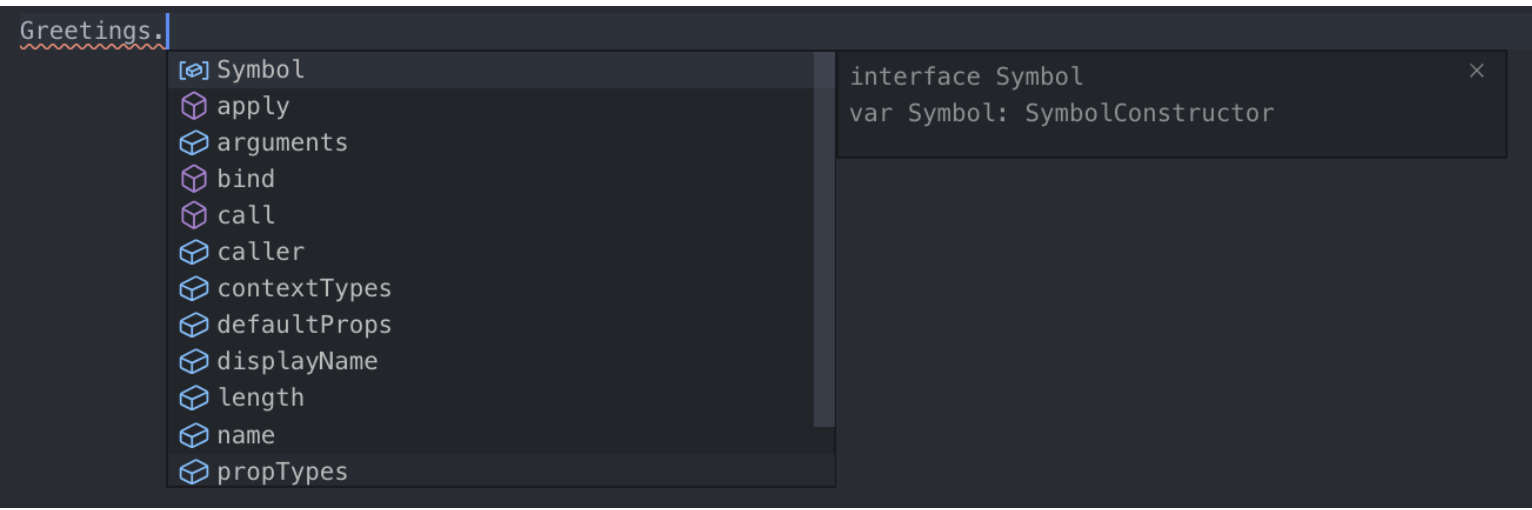
- props includes children by default
- Cons
- Because children is always included, the type isn't explicit
- defaultProps does not work
const Greetings: React.FC<GreetingsProps> = ({ name, mark = '!' }) => (
  <div>
    Hello, {name} {mark}
  </div>
);
- Reference page: https://velog.io/@velopert/create-typescript-react-component
TypeScript official page: Do's and Don'ts guide
General Types
- Don’t
- Never use the Number, String, Boolean, or Object types. These types refer to non-primitive boxed objects that are almost never used appropriately in JavaScript code.
- Do
- Use number, string, and boolean.
/* WRONG */
function reverse(s: String): String;

/* OK */
function reverse(s: string): string;
Callback Types Return Types of Callbacks
- Don’t
- Don't use any as the return type of a callback whose value will be ignored.
- Do
- Use void as the return type of a callback whose value will be ignored.
/* WRONG */
function fn(x: () => any) {
  x();
}

/* OK */
function fn(x: () => void) {
  x();
}

// Why? Because using void is safer as it prevents the mistake of using x's return type in an unverified way.
function fn(x: () => void) {
  var k = x(); // oops! meant to do something else
  k.doSomething(); // error, but would be OK if the return type had been 'any'
}
Function Overloads
- Don’t
- Don't put a general signature before a more specific one.
- Do
- Order signatures so that the general signature comes after the more specific ones.
/* WRONG */
declare function fn(x: unknown): unknown;
declare function fn(x: HTMLElement): number;
declare function fn(x: HTMLDivElement): string;
var myElem: HTMLDivElement;
var x = fn(myElem); // x: unknown, wat?

/* OK */
declare function fn(x: HTMLDivElement): string;
declare function fn(x: HTMLElement): number;
declare function fn(x: unknown): unknown;
var myElem: HTMLDivElement;
var x = fn(myElem); // x: string, :)
Use Optional Parameters
- Don’t
- Don't write multiple signatures that differ only in trailing parameters.
- Do
- Use optional parameters whenever possible.
/* WRONG */
interface Example {
  diff(one: string): number;
  diff(one: string, two: string): number;
  diff(one: string, two: string, three: boolean): number;
}

/* OK */
interface Example {
  diff(one: string, two?: string, three?: boolean): number;
}
Note that this approach is only possible when all signatures have the same return type!!
Use Union Types
- Don’t
- Don't use overloading when only one parameter type differs.
- Do
- Use union types whenever possible.
/* WRONG */
interface Moment {
  utcOffset(): number;
  utcOffset(b: number): Moment;
  utcOffset(b: string): Moment;
}

/* OK */
interface Moment {
  utcOffset(): number;
  utcOffset(b: number | string): Moment;
}
-
Reference pages:
type assertion
// because it's inferred as an empty object with no properties..
var foo = {};
foo.bar = 123; // error: property 'bar' does not exist on `{}`
foo.bas = 'hello'; // error: property 'bar' does not exist on `{}`

interface Foo {
  bar: number;
  bas: string;
}
var foo = {} as Foo; // resolved with type assertion
foo.bar = 123;
foo.bas = 'hello';
interface
interface generic
interface Dropdown<T, G> {
  value: T;
  selected: G;
}

const obj2: Dropdown<string, boolean> = { value: 'abc', selected: false };
interface extends
interface Person {
  name: string;
}
interface Drinker extends Person {
  drink: string;
}
interface Developer extends Drinker {
  skill: string;
}
let fe = {} as Developer;
fe.name = 'hong';
fe.skill = 'TypeScript';
fe.drink = 'Beer';
interface readonly
interface ReadOnly {
  readonly test: string;
}

let params: ReadOnly = {
  test: 'test3',
};
params.test = 'test4'; // error!
type-aliases
generic
type Developer = {
  name: string;
  skill: string;
};

type typeGeneric<T> = {
  name: T;
};
A type alias doesn't create a brand-new type value; rather, it's like giving a name to a defined type so that developers can observe it more easily.
That's why when you define an interface and hover the cursor over it, it shows interface xx, whereas a type shows it in detail as type xx = {xx: xx}.
Extension
type test1 = { name: string };

type test2 = test1 & { age: number };
Removing properties
type XYZ = {
  x: number;
  y: number;
  z: number;
};
// suppose we want to exclude the y and z properties to make it look like below
type X = { x: number };

// ts 3.5 and above use omit
type X = Omit<XYZ, 'x' | 'y'>;
null, undefined
The postfix ! : the assertion operator asserts that the operand is not null or undefined
this.todosStore = props.store!; // the postfix exclamation mark (!) assertion operator asserts that the operand is not null or undefinedOptional chaining
const deathsList = $('.deaths-list');
deathsList?.appendChild(li);
Using type assertion
const deathsList = $('.deaths-list');
deathsList!.innerHTML = null; // using the type assertion !

// or use as to forcibly inject the type, telling ts that it's not null.
const deathsList = $('.deaths-list') as HTMLDivElement;
deathsList.innerHTML = null; // using the type assertion !
Filtering out null with an if statement
const deathsList = $('.deaths-list');

if (!deathsList) return;

deathsList.innerHTML = null;
utility type
Partial
Lets you define a type that satisfies a subset of a specific type.

```tsx
interface Address {
  email: string;
  address: string;
}

type MyEmail = Partial<Address>;
const me: MyEmail = {}; // allowed
const you: MyEmail = { email: 'gmm117@naver.com' }; // allowed
const all: MyEmail = { email: 'gmm117@naver.com', address: 'seoul' }; // allowed
```
Exclude<T, U>
Constructs a type by excluding from T the intersecting properties that are assignable to U.
```tsx
type T0 = Exclude<'a' | 'b' | 'c', 'a'>; // "b" | "c"
type T1 = Exclude<'a' | 'b' | 'c', 'a' | 'b'>; // "c"
type T2 = Exclude<string | number | (() => void), Function>; // string | number
```
Extract<T, U>
Constructs a type by extracting from T the intersecting properties that are assignable to U.
```tsx
type T0 = Extract<'a' | 'b' | 'c', 'a' | 'f'>; // "a"
type T1 = Extract<string | number | (() => void), Function>; // () => void
```
NonNullable
Constructs a type by excluding null and undefined from T.
```tsx
type T0 = NonNullable<string | number | undefined>; // string | number
type T1 = NonNullable<string[] | null | undefined>; // string[]
```
Readonly
Constructs a type with all properties of T set to readonly, meaning the properties of the resulting type cannot be reassigned.

```tsx
interface Todo {
  title: string;
}

const todo: Readonly<Todo> = {
  title: 'Delete inactive users',
};

todo.title = 'Hello'; // error: cannot reassign a read-only property
```
Pick
Defines a type by selecting a few properties from a specific type

```tsx
interface Address {
  email: string;
  address: string;
}

type MyEmail = Pick<Address, 'email'>;
// uses only part of it, the email property
```
Omit
Defines a type with certain properties removed (the opposite of pick)

```tsx
interface Address {
  email: string;
  address: string;
}

type MyEmail = Omit<Address, 'address'>;
// removes the address property
```
ReturnType
Constructs a type consisting of the return type of function T.
```tsx
declare function f1(): { a: number; b: string };
type T0 = ReturnType<() => string>; // string
type T1 = ReturnType<(s: string) => void>; // void
type T2 = ReturnType<<T>() => T>; // {}
type T3 = ReturnType<<T extends U, U extends number[]>() => T>; // number[]
type T4 = ReturnType<typeof f1>; // { a: number, b: string }
type T5 = ReturnType<any>; // any
type T6 = ReturnType<never>; // any
```
-
InstanceType
Constructs a type consisting of the instance type of a constructor function type T. class C { x = 0; y = 0; } type T0 = InstanceType<typeof C>; // C type T1 = InstanceType<any>; // any type T2 = InstanceType<never>; // any -
Required
Constructs a type with all properties of T set to required. interface Props { a?: number; b?: string; } const obj: Props = { a: 5 }; // succeeds const obj2: Required<Props> = { a: 5 }; // error: property 'b' is missing
Let's specify the essential tsconfig options
When the strictNullChecks option is on
// when --strictNullChecks is turned off in the compiler options, null and undefined can each be used as values of different types.
"compilerOptions": {
    "strictNullChecks": true,
}

const a: null = null;
const b: string = a; // error when strictNullChecks is turned on
When the noImplicitAny option is on
// if a type is not explicitly specified and TypeScript infers it as 'any', a compile error occurs.
"compilerOptions": {
    "noImplicitAny": true,
}

// error TS7006: Parameter 'a' implicitly has an 'any' type
function f3(a) {
  if(a > 0) {
    return a*38
  }
}
When the noImplicitReturns option is on
// if not all code paths within a function return a value, a compile error is raised.
"compilerOptions": {
    "noImplicitReturns": true,
}

// you must explicitly return in all code paths.
// error TS7030: Not all code paths returns a value
function f5(a) {
  if(a > 0) {
    return a*38
  }
}