To use JSX, you always had to import React (even if you didn't reference it explicitly).
This was because JSX code was transpiled into plain JavaScript through tools like Babel or TypeScript.
<= v16
import React from 'react';function App() { return <h1>Hello World</h1>;}// JSX -> 일반 자바스크립트function App() { return React.createElement('h1', null, 'Hello world');}
Starting from v17, you no longer need to type the 'import React ~' statement directly.
v17
function App() { return <h1>Hello World</h1>;}// Inserted by a compiler (don't import it yourself!)import { jsx as _jsx } from 'react/jsx-runtime';function App() { return _jsx('h1', { children: 'Hello world' });}
# for npm usersnpm update @babel/core @babel/plugin-transform-react-jsx# for yarn usersyarn upgrade @babel/core @babel/plugin-transform-react-jsx
@babel/preset-react
# for npm usersnpm update @babel/core @babel/preset-react# for yarn usersyarn upgrade @babel/core @babel/preset-react
babel config
// If you are using @babel/preset-react{ "presets": [ ["@babel/preset-react", { "runtime": "automatic" }] ]}// If you're using @babel/plugin-transform-react-jsx{ "plugins": [ ["@babel/plugin-transform-react-jsx", { "runtime": "automatic" }] ]}
Bulk-removing unnecessary imports after upgrading to v17 (optional)
react-codemod
// general reactimport React from 'react';function App() { return <h1>Hello World</h1>;}--transpile;function App() { return <h1>Hello World</h1>;}
In versions 16 and below, every component would always throw an error when it returned undefined.
However, due to a coding oversight, this error handling was missing for forwardRef and memo components, and it has now been added.
Starting from v17, forwardRef and memo components also throw an error when they return undefined.
<= v16function Button() { return; // Error: Nothing was returned from render}function Button() { // We forgot to write return, so this component returns undefined. // React surfaces this as an error instead of ignoring it. <button />;}v17 +let Button = forwardRef(() => { // We forgot to write return, so this component returns undefined. // React 17 surfaces this as an error instead of ignoring it. <button />;});let Button = memo(() => { // We forgot to write return, so this component returns undefined. // React 17 surfaces this as an error instead of ignoring it. <button />;});
If you intentionally want to render nothing, you must return null.
Effect Cleanup Timing
React is making the cleanup timing of the useEffect lifecycle method behave consistently.
When the cleanup has to perform a lot of work, it can cause performance degradation in operations such as page transitions.
(If you do need effect/cleanup to run synchronously, use useLayoutEffect.)
After v17 is applied, the order is: component unmounts → component/screen updates → cleanup runs.
However, because cleanup runs after unmount, the code below can cause problems when a page transition occurs.
useEffect(() => { someRef.current.someSetupMethod() return () => { someRef.current.someCleanupMethod() }})useEffect(() => { const instance = someRef.current -> closure를 통해서 unmounted 하더라도 gc가 사라지지 않게 처리 instance.someSetupMethod() return () => { instance.someCleanupMethod() }})
No Event Pooling
Event pooling
Because there was an issue where using event objects in older browsers caused performance degradation, React created and managed a Synthetic Event pool.
When a user triggers a particular event
It passes a reference to a Synthetic Event object from the Synthetic Event pool (→ reducing object creation time)
It populates the Synthetic Event object with the event information
It runs the event listener defined by the user
It resets the Synthetic Event object (→ by assigning null so that GC can reclaim the memory, a step for memory efficiency)
This feature can cause errors to occur in asynchronous operations.
To resolve this issue, using React's persist to remove the event from the event pool and fall back to the traditional event approach works without any problems, but you give up the performance benefit.
Starting from v17, React decided to no longer support the behavior that compensated for performance issues in legacy browsers.
However, the event.persist() method still exists, though calling it does nothing (kept for backward compatibility).
Changes to event delegation
First, let's look at the code that attaches an event handler in React.
<button onClick={handleClick}>
In vanilla DOM, it would work like this.
myButton.addEventListener('click', handleClick);
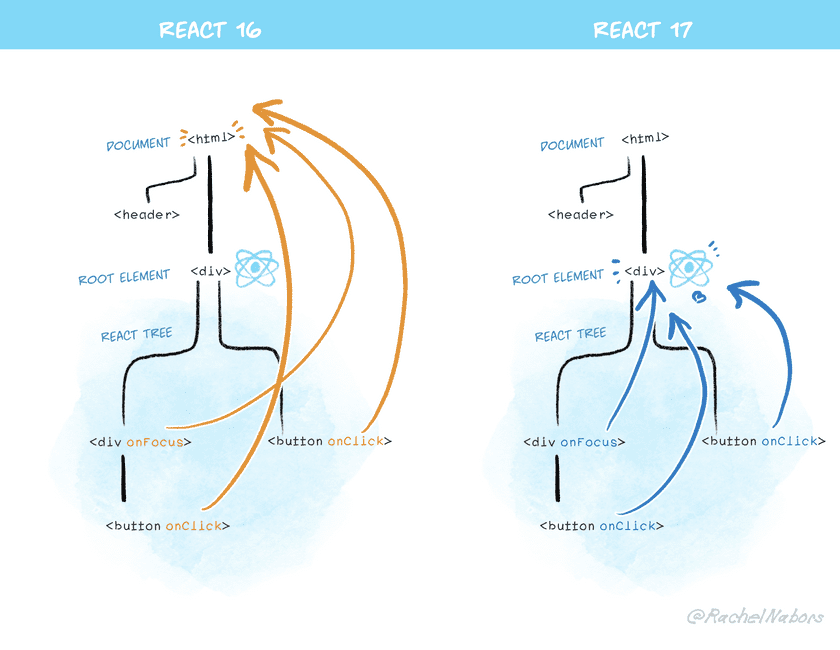
In React, event handlers are not attached to the actual declared DOM element but added to the document node.
Starting from React 17, events are delegated to the React Tree Root instead of the document.
Even when multiple React components run, because events are handled at the base Root Element, the structure and event handling can operate independently.
This makes it easier to use React alongside other technologies. If jQuery exists on the outside and React exists on the inside, you can now stop event propagation down to the jQuery layer as expected.
However, there may be code that manually attaches an event using document.addEventListener on the DOM to detect all React events. This kind of code was possible in React 16, but starting from React 17 the propagation is blocked, so you cannot tell whether events are firing at the document level. This means you need to switch to the capture approach.
// <= v16document.addEventListener('click', function () { // This custom handler will no longer receive clicks // from React components that called e.stopPropagation()});// v17+document.addEventListener( 'click', function () { // Now this event handler uses the capture phase, // so it receives *all* click events below! }, { capture: true },);