recoil
SeungAh Hong
What is Recoil?
Reference code (redux-toolkit vs recoil): https://github.com/seungahhong/states-todos
Limitations of React's state management logic
- ContextAPI creates dependencies through coupling between parent and child
- In particular, it causes re-rendering issues
- It is not really state management (initial setup, read, write)
Why do we need Recoil?
- It keeps the API as React-like as possible
- It minimizes the auxiliary libraries required for use (especially redux, mobx, redux-toolkit)
- Issues that forced you to use the react-redux library in order to use redux/react are handled internally by Recoil
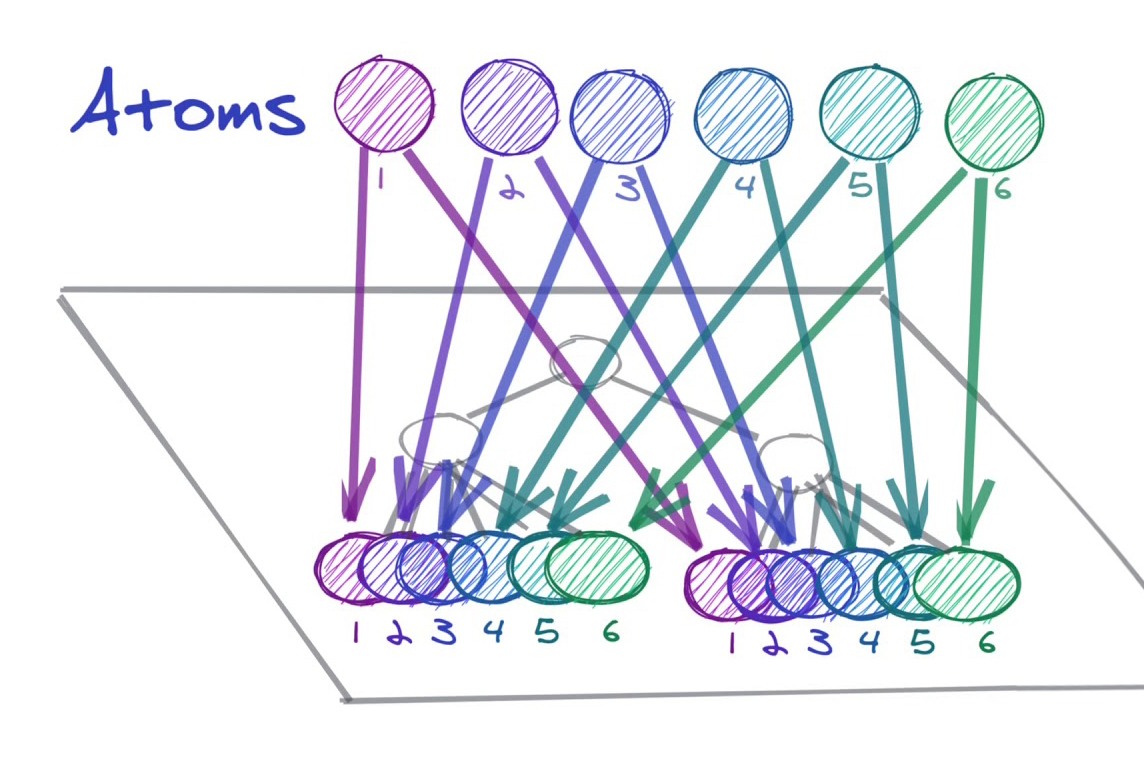
- It breaks the dependency between parent and child, delivering data to components from an independent store.
- In particular, you can apply atoms and selectors immediately without touching the existing logic.
Recoil philosophy
- It manages local state in React (useState, useReducer) using a low-boilerplate API (React Hooks)
redux, reducer, constant

useEffect(() => {
  (async () => {
		await fetch~~
    -> redux 호출
  })();

}, []);

const allMainFetch = selector({
  key: 'allMainFetch',
  get: async ({ get }) => await get(fetch~~)
  })
});

const main = useRecoilValue(allMainFetch());- Derived data is updated automatically. (selector)
- If A, B ⇒ C changes, previously you had to fetch A and B data and update C manually, but with Recoil, if you specify it in a selector, it updates automatically. (components that have a dependency are updated automatically)
- It is said to be equivalent to compute in mobx
// 파생데이터
const firstAtom = atom({
  key: 'firstAtomKey',
  default: 1,
});

const secondAtom = atom({
  key: 'firstAtomKey',
  default: 1,
});

const cumulatedSelector = selector({
  key: 'cumulatedSelector',
  get: ({ get }) => {
    return get(firstAtom) + get(secondAtom);
  },
});

// atom
import { atom, useRecoilState } from 'recoil';

const counter = atom({
  key: 'myCounter',
  default: 0,
});

function Counter() {
  const [count, setCount] = useRecoilState(counter);
  const incrementByOne = () => setCount(count + 1);

  return (
    <div>
      Count: {count}
      <br />
      <button onClick={incrementByOne}>Increment</button>
    </div>
  );
}-
atom : the basic unit that holds data
- If you think of it in redux terms, it is responsible for part of the store. When you have it, you can use built-in custom hooks for the processing previously handled by reducers and actions
-
selector
- It can compose atoms and other selectors
- It creates derived state
- When an atom it depends on is updated, it updates along with it, so there is no management burden.
-
hooks api (atom and selector use the same api)
[useRecoilState()](https://recoiljs.org/ko/docs/api-reference/core/useRecoilState): Use this Hook when you want to read from and write to an atom. This Hook subscribes a component to the atom.[useRecoilValue()](https://recoiljs.org/ko/docs/api-reference/core/useRecoilValue): Use this Hook when you only want to read an atom. This Hook subscribes a component to the atom.[useSetRecoilState()](https://recoiljs.org/ko/docs/api-reference/core/useSetRecoilState): Use this Hook when you only want to write to an atom.[useResetRecoilState()](https://recoiljs.org/ko/docs/api-reference/core/useResetRecoilState): Use this Hook when you want to reset an atom to its default value.
-
Usage recommendations
- For large-scale projects and unidirectional development, use flux
- For small projects where multiple states and components are intertwined, use Recoil
-
Drawbacks
- Debugging can be difficult (derived data updates)
- Derived data updates can become intertwined dependently and cause an infinite loop (b=cselector cselector=b), so developer skill is required. That said, Recoil is designed to prevent infinite loops
What would have been better if I had applied Recoil to the store detail page?
- Because of Redux's global store, the code became somewhat complex as I applied React.memo for rendering optimization
- In particular, if I had connected the screen components to atoms that matched the data they needed, the rendering optimization code probably would not have been necessary
- I could have reduced the Redux boilerplate code as much as possible, and it would have been easier to write with the functional components that React is promoting.
Handling asynchronous work
- Suspense, ErrorBoundary
- Recoil is designed to work with React Suspense to handle pending data
- A Recoil selector can throw an error describing what might go wrong when a component tries to use a particular value. This uses React's
const currentUserNameQuery = selector({
  key: 'CurrentUserName',
  get: async ({ get }) => {
    const response = await myDBQuery({
      userID: get(currentUserIDState),
    });
    if (response.error) {
      throw response.error;
    }
    return response.name;
  },
});

function CurrentUserInfo() {
  const userName = useRecoilValue(currentUserNameQuery);
  return <div>{userName}</div>;
}

<RecoilRoot>
  <ErrorBoundary>
    <React.Suspense fallback={<div>Loading...</div>}>
      <CurrentUserInfo />
    </React.Suspense>
  </ErrorBoundary>
</RecoilRoot>;- class Loadable
- This state may hold an available value, be in an error state, or still be pending an asynchronous resolution.
state: the latest state of an atom or selector. The possible values are 'hasValue', 'hasError', or 'loading'.contents: the value represented by theLodable. If the state ishasValue, this is the actual value. If the state ishasError, this is the thrown Error object- useRecoilStateLoadable : used in asynchronous work; a writable atom or selector
- useRecoilValueLoadable: used in asynchronous work; a read-only atom or selector
function UserInfo({ userID }) {
  const userNameLoadable = useRecoilValueLoadable(currentUserNameQuery());
  const [userNameLoadable, setUserName] = useRecoilStateLoadable(
    currentUserNameQuery(),
  );
  switch (userNameLoadable.state) {
    case 'hasValue':
      return <div>{userNameLoadable.contents}</div>;
    case 'loading':
      return <div>Loading...</div>;
    case 'hasError':
      throw userNameLoadable.contents;
  }
}
isRecoilValue
- Returns true if the value is an atom or a selector, and false otherwise.
import { atom, isRecoilValue } from 'recoil';

const counter = atom({
  key: 'myCounter',
  default: 0,
});

const strCounter = selector({
  key: 'myCounterStr',
  get: ({ get }) => String(get(counter)),
});

isRecoilValue(counter); // true
isRecoilValue(strCounter); // true
atomFamily/selectorFamily
- atomFamily is the same as atom, but it can accept a parameter that lets you distinguish it from other instances.
- If you provide only a single key to atomFamily, a unique key is generated for each underlying atom
// atom
const itemWithId = memoize(id => atom({
  key: `item-${id}`,
  default: ...
}))

// atomFamily
const itemWithId = atomFamily({
  key: 'item',
  default: ...
});

const getImage = async id => {
  return new Promise(resolve => {
    const url = `http://someplace.com/${id}.png`;
    let image = new Image();
    image.onload = () =>
      resolve({
        id,
        name: `Image ${id}`,
        url,
        metadata: {
          width: `${image.width}px`,
          height: `${image.height}px`
        }
      });
    image.src = url;
  });
};

export const imageState = atomFamily({
  key: "imageState",
  default: id => getImage(id)
});
noWait
- This helper is similar to useRecoilValueLoadable(), but the difference is that it is a selector rather than a hook.
- Because noWait() returns a selector, it can be used together with other Recoil selectors and within hooks
const myQuery = selector({
  key: 'MyQuery',
  get: ({ get }) => {
    const loadable = get(noWait(dbQuerySelector));

    return {
      hasValue: { data: loadable.contents },
      hasError: { error: loadable.contents },
      loading: { data: 'placeholder while loading' },
    }[loadable.state];
  },
});
Snapshot
You wouldn't use a state management library to hold unchanging, static data. State changes constantly. A snapshot is "one moment" of continuously changing state. If state were a video, a snapshot would be a single frame of that video.
[useRecoilSnapshot()](https://recoiljs.org/ko/docs/api-reference/core/useRecoilSnapshot)- A snapshot is created every time the state changes. Therefore, the SnapshotCount component re-renders every time the state changes.
<RecoilRoot>
  <Counter />
  <SnapshotCount />
</RecoilRoot>;

const counter = atom({
  key: 'counter',
  default: 0,
});

export default function Counter() {
  const [count, setCount] = useRecoilState(counter);
  const incrementByOne = () => setCount(count + 1);

  return (
    <div>
      Count: {count}
      <br />
      <button onClick={incrementByOne}>Increment</button>
    </div>
  );
}

import { useRecoilSnapshot } from 'recoil';

function SnapshotCount() {
  const snapshotList = useRef([]);
  const updateSnapshot = useRecoilCallback(({ snapshot }) => () => {
    snapshotList.current = [...snapshotList.current, snapshot];
    console.log('updated:', snapshotList.current);
  });

  return (
    <div>
      <p>Snapshot count: {snapshotList.current.length}</p>
      <button onClick={updateSnapshot}>현재 스냅샷 보관</button>
    </div>
  );
}[useRecoilCallback()](https://recoiljs.org/ko/docs/api-reference/core/useRecoilCallback)- Like useCallback, it creates a memoized function that is refreshed according to its dependencies. The difference is that the created function is also passed an object and functions for handling the snapshot and state.
function SnapshotCount() {
  const snapshotList = useRef([]);
  const snapshot = useRecoilSnapshot();

  useEffect(() => {
    snapshotList.current = [...snapshotList.current, snapshot];
  }, [snapshot]);

  return <p>Snapshot count: {snapshotList.current.length}</p>;
}- useGotoRecoilSnapshot
- A function that can revert to a specific snapshot state
function SnapshotCount() {
  const [snapshotList, setSnapshotList] = useState([]);
  const updateSnapshot = useRecoilCallback(({ snapshot }) => async () => {
    setSnapshotList(prevList => [...prevList, snapshot]);
  });
  const gotoSnapshot = useGotoRecoilSnapshot();

  return (
    <div>
      <p>Snapshot count: {snapshotList.length}</p>
      <button onClick={updateSnapshot}>현재 스냅샷 보관</button>
      <ul>
        {snapshotList.map((snapshot, index) => (
          <li key={index}>
            <button onClick={() => gotoSnapshot(snapshot)}>
              Snapshot #{index + 1}
            </button>
          </li>
        ))}
      </ul>
    </div>
  );
}
Recoil project retrospective
Good points
- Previously it was inconvenient because I had to update everything manually through actions and the store, but with Recoil, when I only did a set, get was called automatically, which was convenient.
- I liked that I didn't have to worry about immutability. (redux: spread, immer)
- I liked that caching was provided.
- I liked that rendering happened only where it was truly needed, so I didn't have to do things like React.memo.
Disappointing points
- Because async is provided only in get, there were many inconveniences when setting other state. (You have to create an atom to store the state value, which increases the amount of code)
- I used useRecoilCallback to handle snapshots, but even when I updated the state within that function, the reference was tied to the existing snapshot, so I couldn't fetch the updated data.