cypress
What is E2E Testing?
- E2E testing is a way to test the final product from the user's perspective. It refers to End-to-End Testing that verifies, from the user's point of view, whether the desired text is displayed correctly on a page and whether the correct behavior occurs when a button is clicked.
E2E Testing Considerations
- It tests between Endpoints, running tests under the assumption of situations in which a real user uses the product (writing scenarios from the user's perspective).
- In general, it performs scenario and functional testing through the GUI on the web or in apps.
- It inspects the parts that are directly exposed to users.
- It can even cover user-perspective testing that is impossible with unit tests.
- Passing the endpoint tests means the feature works well, so if you can't run every kind of test, it's a good idea to at least run E2E Tests!
Advantages of Cypress
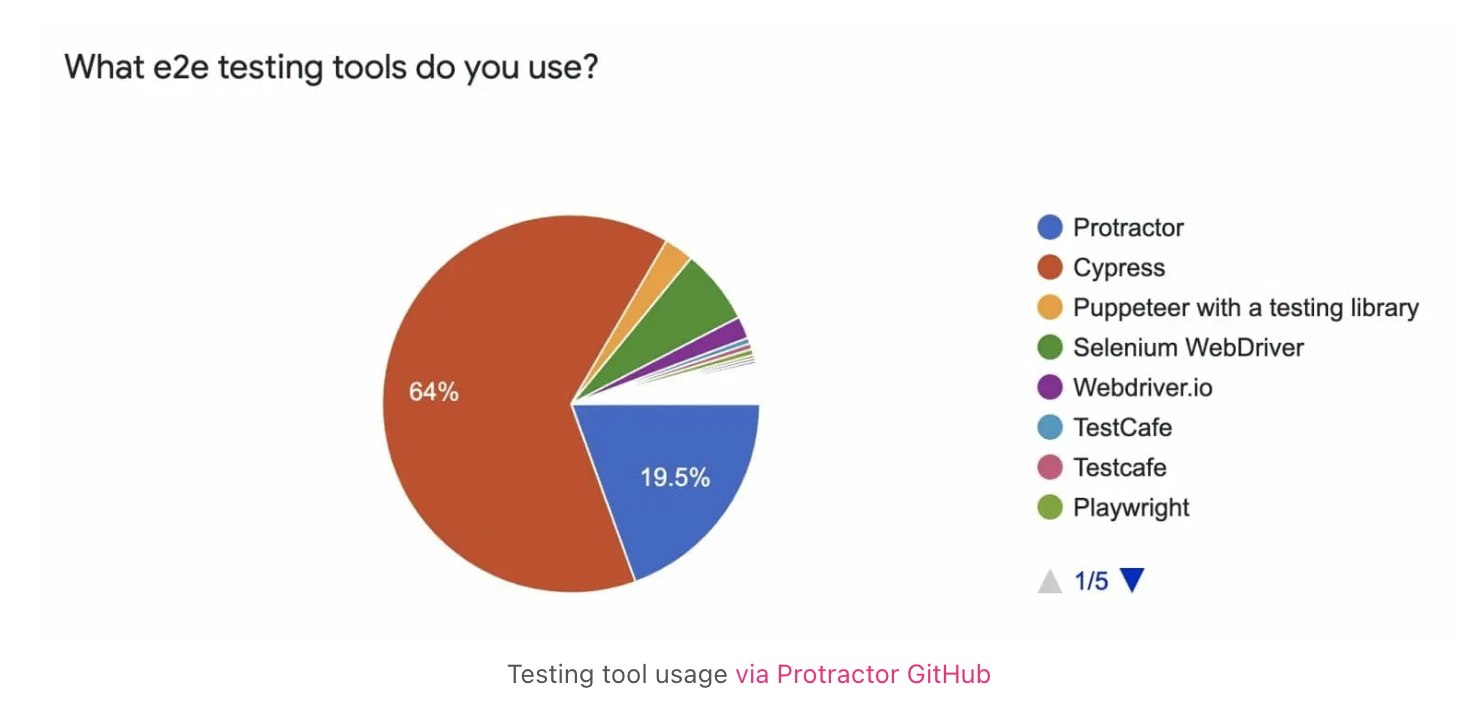
e2e market share: Cypress 64%
All-in-one test tool
Before Cypress, end-to-end testing required several different tools, but with Cypress you can use these integrated capabilities as a single library.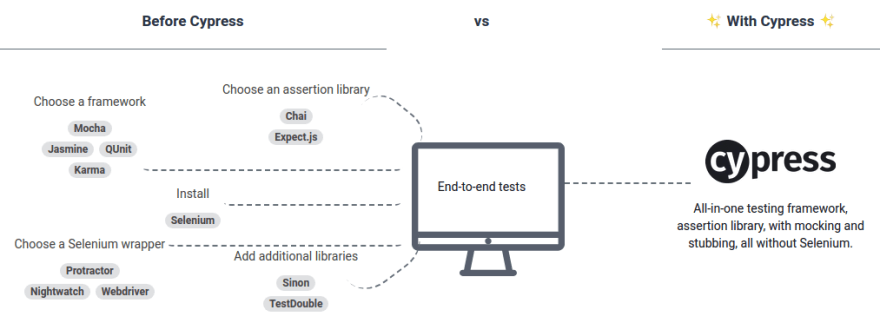
E2E test Top 5 Feature
It provides most of the features you need, and in particular it uses JS, a language widely used in web development.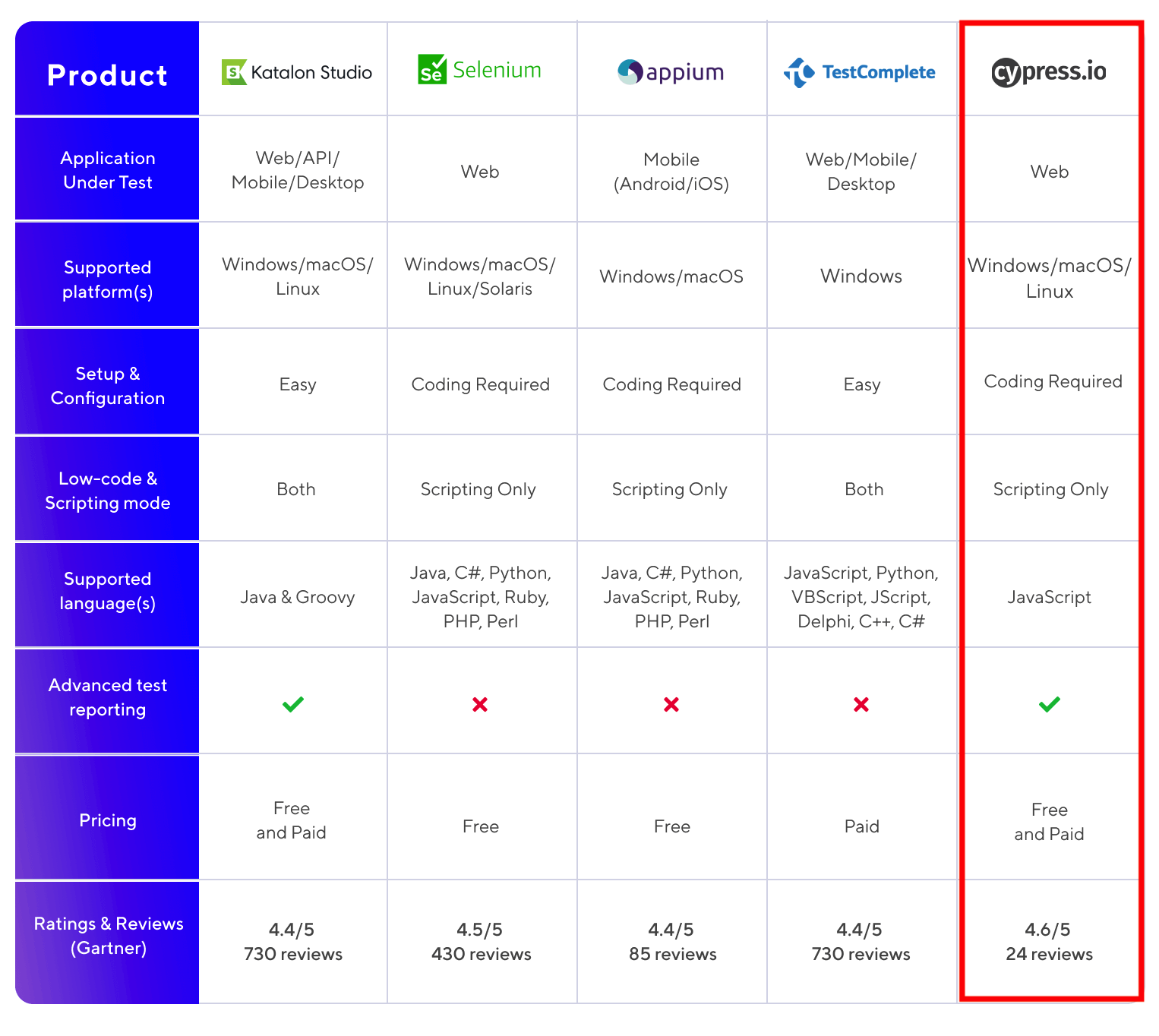
Cypress Testing Case Studies from Other Companies
CLASS101 Cypress Adoption Case
As the CLASS101 service grew day by day, the codebase grew along with it, and the probability of bugs increased accordingly. **When the service was small, the existing QA process—such as having someone manually test the UI—was sufficient**, but by now **the scope and time required had grown significantly, so a more systematic and new process was needed**. There are many software testing approaches, such as unit testing and integration testing, but they decided to **build E2E tests that run in an environment as close as possible to the user's**.Kakao Cypress Adoption Case
- For functional testing, they used the Visual Regression approach, which determines test success by comparing images. - For visual testing, they manipulate and verify the screen by traversing the DOM tree / performing visual test verification against two criteria.Line Cypress Presentation Case
By leveraging Cypress, they were able to solve the pain points of running existing automated tests (initial setup during development, increased execution time, difficulty writing and maintaining scripts) and build an effective [test harness](https://en.wikipedia.org/wiki/Test_harness) using limited time and resources. Cypress is a web-based End-to-End JavaScript testing framework. It does not depend on Selenium, and it is a tool that lets you write and operate assertions more concisely by directly leveraging [Mocha](https://mochajs.org/), [Chai](https://www.chaijs.com/), and so on, and it is a tool that controls network traffic and performs API testing more effectively.NHN Cypress Introduction
Because Cypress runs in the browser, it's easy to write code or debug while looking at the UI as it actually appears on screen.What Should You Consider When Testing with Cypress?
Writing scenarios (Planning/QA/Test engineer)
- Writing testing scenarios that account for the user interface (UI) - Writing test scenarios that can automate tests previously done manually (live-deployment sanity checks, basic verification) - Writing scenarios not only for the Happy case but also for the Bad case/*
* 1. 테스트의 동작을 기술한다.
* 2. 테스트 수행할 행동에 대해서 기술한다.
* 3. https://example.cypress.io 방문한다.
* 4. type 텍스트가 있는 엘리먼트를 클릭한다.(/commands/actions url 이동)
* 5. 브라우저 주소창에 /commands/actions 매칭되는지 체크
* 6. action-email 스타일 엘리먼트 선택한다.
* 7. input 엘리먼트에 fake@email.com 입력한다.
* 8. input 엘리먼트에 fake@email.com 값이 추가됐는지 여부를 체크한다.
* 사용자 인터페이스(UI)를 고려한 시나리오 작성이 필수....
*/
describe('My First Test', () => {
it('Gets, types and asserts', () => {
cy.visit('https://example.cypress.io');
cy.contains('type').click();
// Should be on a new URL which
// includes '/commands/actions'
cy.url().should('include', '/commands/actions');
// Get an input, type into it and verify
// that the value has been updated
cy.get('.action-email')
.type('fake@email.com')
.should('have.value', 'fake@email.com');
});
});FE Developer
- Installation```bash
yarn add -D cypress
yarn cypress open
```
- Write test code based on the scenarios written by Planning/QA
- Build and deploy the test code you wrote
- Setting up Jenkins
- An E2E dashboard to share with the QA team
- Build a dashboard-style page where you can see pass/fail results
Cypress Basics
-
Install cypress
npm install cypress --save-dev or yarn add cypress --save-dev -
Opening the App
npx cypress open or yarn run cypress open or ./node_modules/.bin/cypress open or $(npm bin)/cypress open**Adding npm Scripts**
{ "scripts": { "cypress:open": "cypress open" } } npm run cypress:open or yarn run cypress:open -
CLI tools Choosing a Testing Type
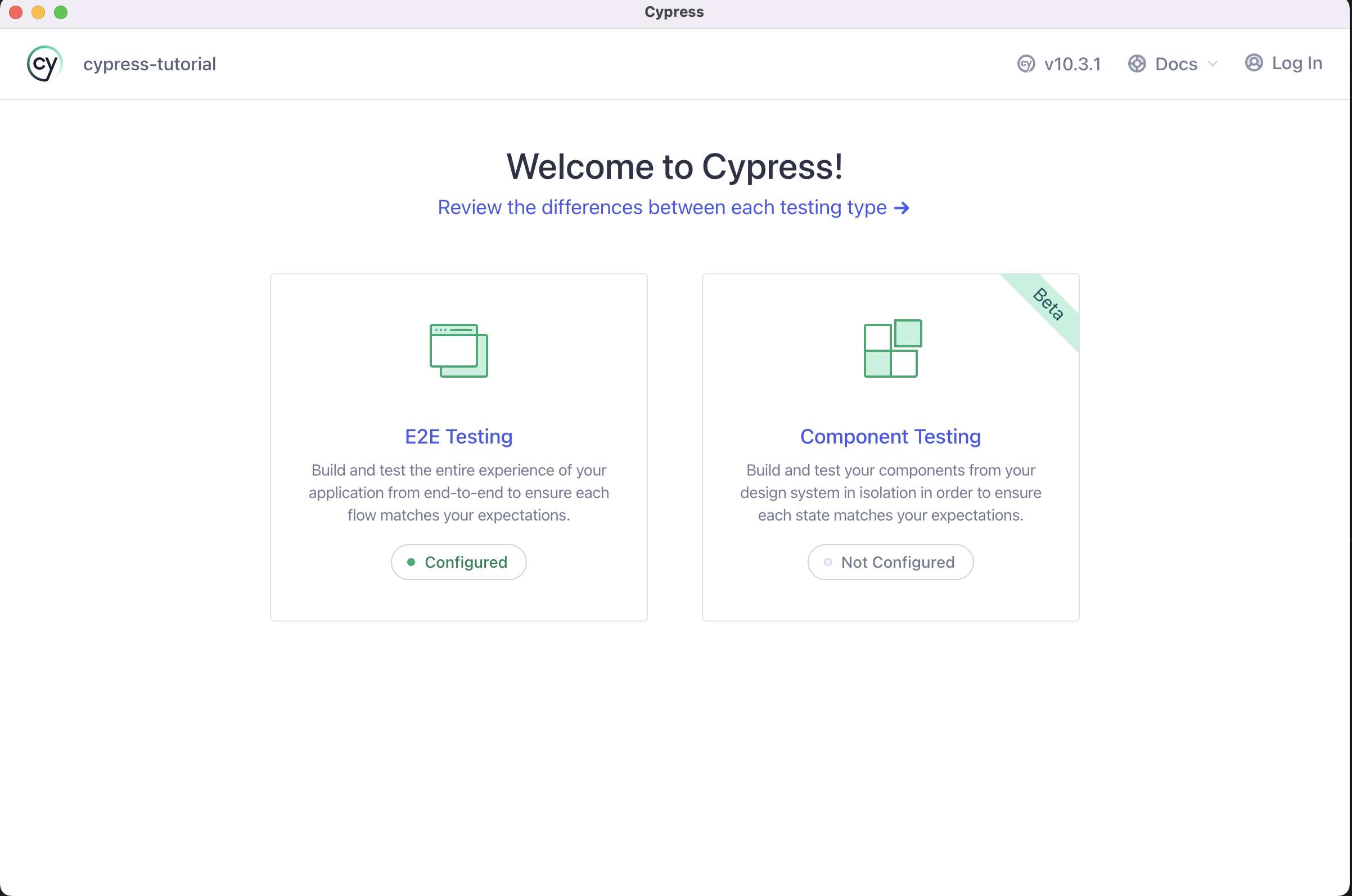 Quick Configuration
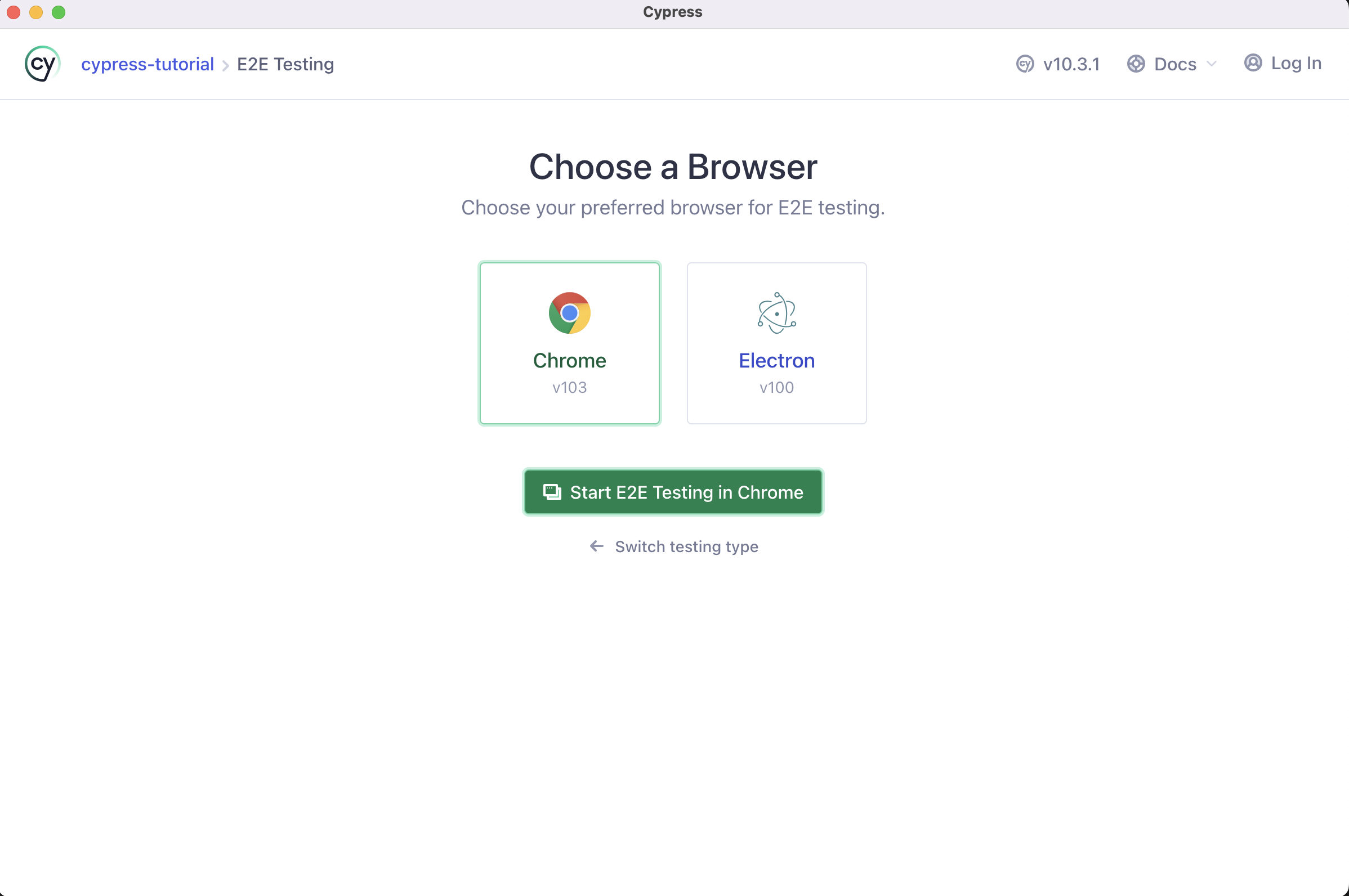
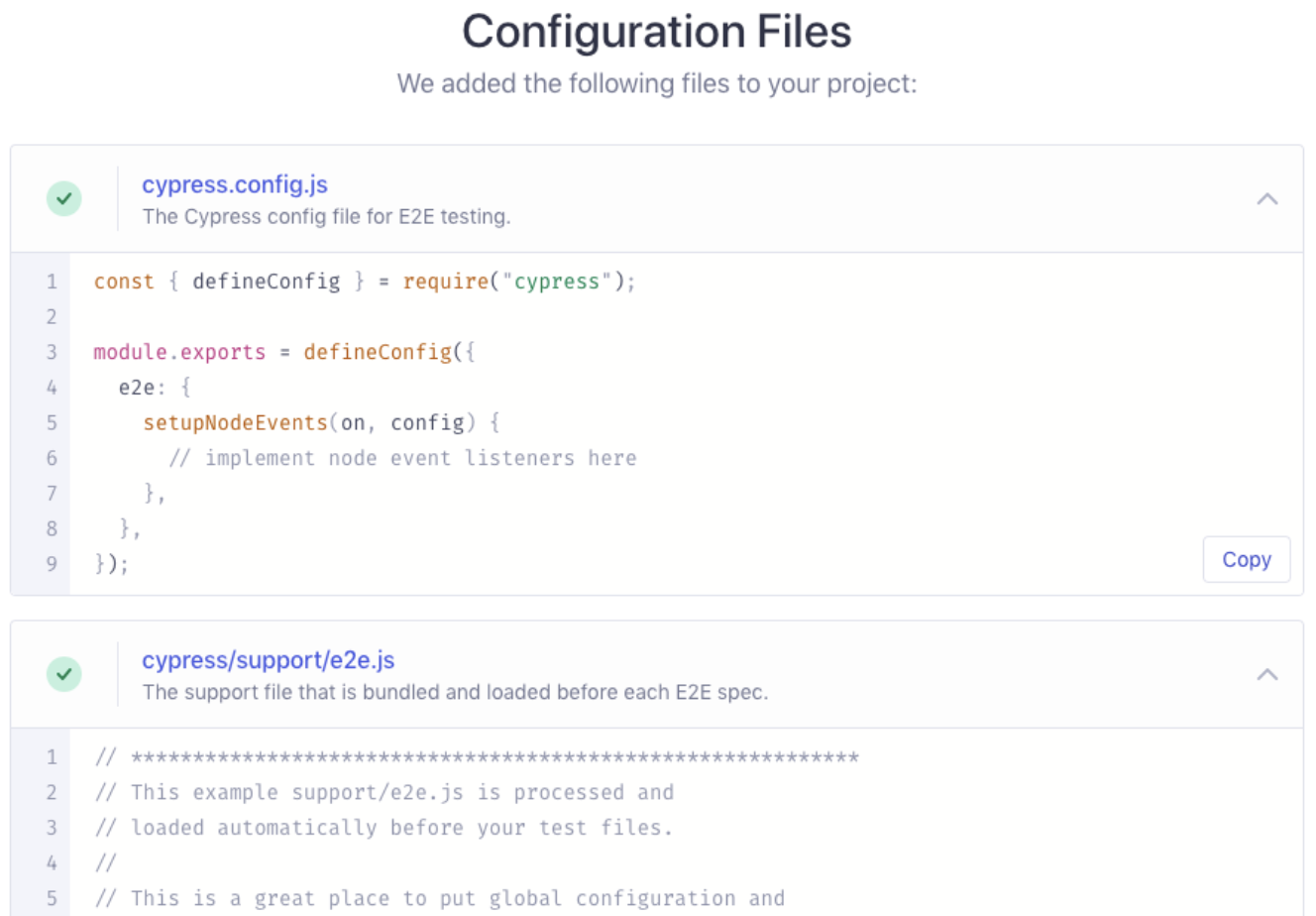 Launching a Browser
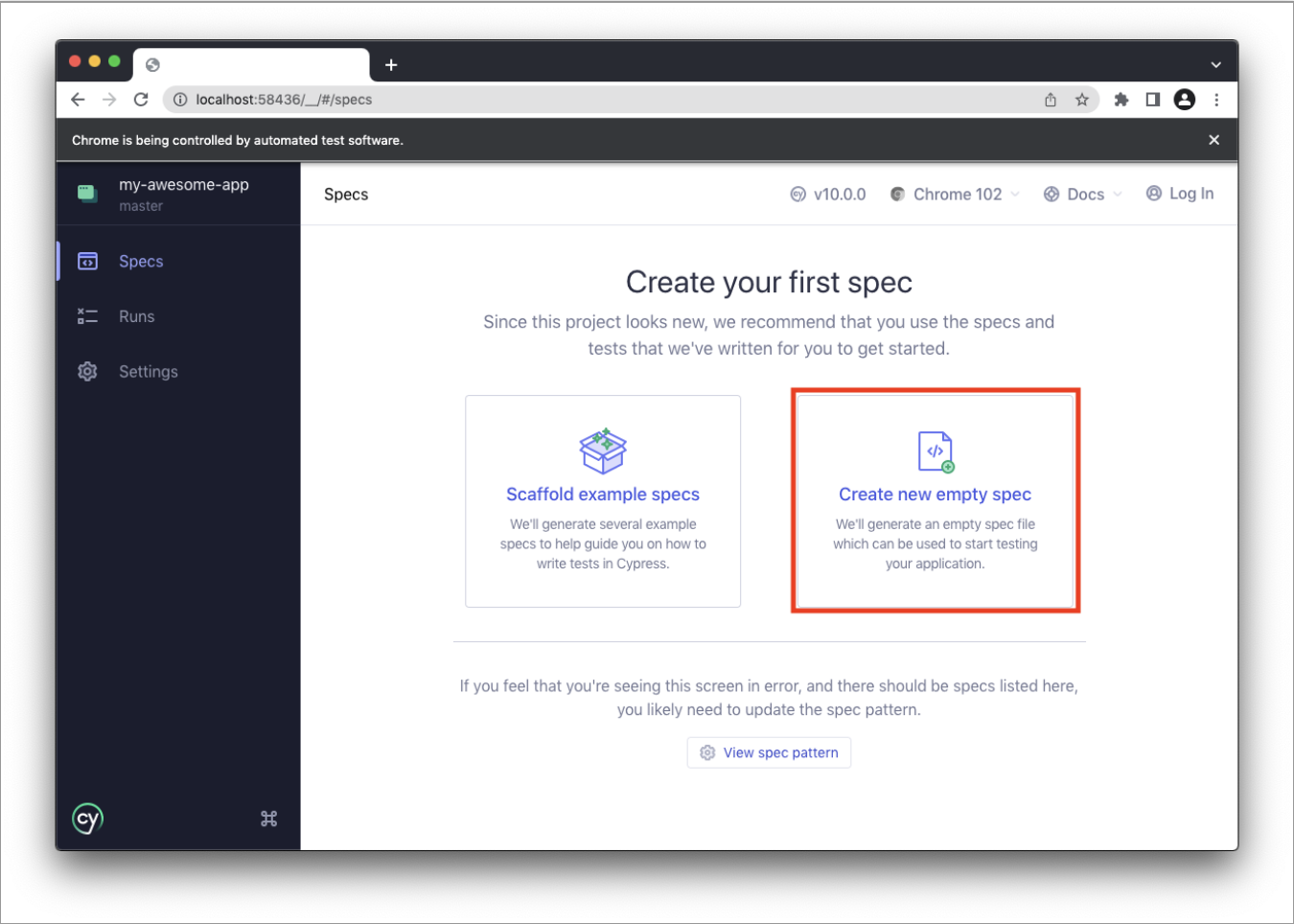
 Add a test file
- Folder path: cypress/e2e
- Scaffold example specs: Adds multiple example test files
- Create new empty spec: Creates a single empty example file
 write test
 - Derived from mocha: description, it
- Derived from chai: expect
describe('My First Test', () => { it('Does not do much!', () => { expect(true).to.equal(false); }); }); -
TypeScript support install @type/node
npm i -D @types/node
or
yarn add -D @types/node
Add tsconfig.json
tsc --init

// Modify the properties that are commented out.
{
  "compilerOptions": {
    "target": "es5",
    "lib": ["es5", "dom"],
    "types": ["cypress", "node"]
  },
  "include": ["**/*.ts"]
}
Configure ts-loader for ts → js transpilation
const wp = require('@cypress/webpack-preprocessor');

module.exports = on => {
  const options = {
    webpackOptions: {
      resolve: {
        extensions: ['.ts', '.tsx', '.js'],
      },
      module: {
        rules: [
          {
            test: /\\.tsx?$/,
            loader: 'ts-loader',
            options: { transpileOnly: true },
          },
        ],
      },
    },
  };
  on('file:preprocessor', wp(options));
};
Providing type definitions for external libraries in a TypeScript environment
// cypress.d.ts
import { mount } from "cypress/react";

// Augment the Cypress namespace to include type definitions for
// your custom command.
// Alternatively, can be defined in cypress/support/component.d.ts
// with a <reference path="./component" /> at the top of your spec.
declare global {
  namespace Cypress {
    interface Chainable {
      mount: typeof mount;
    }
    interface Chainable<Subject> extends Cypress.Chainable {
      xpath<E extends Node = HTMLElement>(
        selector: string,
        options?: Partial<Loggable & Timeoutable>
      ): Chainable<JQuery<E>>;
    }
  }
}

// tsconfig.json
"include": [
  "src",
  "./cypress.d.ts"
]
write e2e typescript test file
// cypress/e2e/ /// <reference types="cypress" /> // Welcome to Cypress! // // This spec file contains a variety of sample tests // for a todo list app that are designed to demonstrate // the power of writing tests in Cypress. // // To learn more about how Cypress works and // what makes it such an awesome testing tool, // please read our getting started guide: // https://on.cypress.io/introduction-to-cypress describe('example to-do app', () => { beforeEach(() => { // Cypress starts out with a blank slate for each test // so we must tell it to visit our website with the `cy.visit()` command. // Since we want to visit the same URL at the start of all our tests, // we include it in our beforeEach function so that it runs before each test cy.visit('https://example.cypress.io/todo'); }); it('displays two todo items by default', () => { // We use the `cy.get()` command to get all elements that match the selector. // Then, we use `should` to assert that there are two matched items, // which are the two default items. cy.get('.todo-list li').should('have.length', 2); // We can go even further and check that the default todos each contain // the correct text. We use the `first` and `last` functions // to get just the first and last matched elements individually, // and then perform an assertion with `should`. cy.get('.todo-list li').first().should('have.text', 'Pay electric bill'); cy.get('.todo-list li').last().should('have.text', 'Walk the dog'); }); it('can add new todo items', () => { // We'll store our item text in a variable so we can reuse it const newItem = 'Feed the cat'; // Let's get the input element and use the `type` command to // input our new list item. After typing the content of our item, // we need to type the enter key as well in order to submit the input. // This input has a data-test attribute so we'll use that to select the // element in accordance with best practices: // https://on.cypress.io/selecting-elements cy.get('[data-test=new-todo]').type(`${newItem}{enter}`); // Now that we've typed our new item, let's check that it actually was added to the list. // Since it's the newest item, it should exist as the last element in the list. // In addition, with the two default items, we should have a total of 3 elements in the list. // Since assertions yield the element that was asserted on, // we can chain both of these assertions together into a single statement. cy.get('.todo-list li') .should('have.length', 3) .last() .should('have.text', newItem); }); it('can check off an item as completed', () => { // In addition to using the `get` command to get an element by selector, // we can also use the `contains` command to get an element by its contents. // However, this will yield the <label>, which is lowest-level element that contains the text. // In order to check the item, we'll find the <input> element for this <label> // by traversing up the dom to the parent element. From there, we can `find` // the child checkbox <input> element and use the `check` command to check it. cy.contains('Pay electric bill') .parent() .find('input[type=checkbox]') .check(); // Now that we've checked the button, we can go ahead and make sure // that the list element is now marked as completed. // Again we'll use `contains` to find the <label> element and then use the `parents` command // to traverse multiple levels up the dom until we find the corresponding <li> element. // Once we get that element, we can assert that it has the completed class. cy.contains('Pay electric bill') .parents('li') .should('have.class', 'completed'); }); context('with a checked task', () => { beforeEach(() => { // We'll take the command we used above to check off an element // Since we want to perform multiple tests that start with checking // one element, we put it in the beforeEach hook // so that it runs at the start of every test. cy.contains('Pay electric bill') .parent() .find('input[type=checkbox]') .check(); }); it('can filter for uncompleted tasks', () => { // We'll click on the "active" button in order to // display only incomplete items cy.contains('Active').click(); // After filtering, we can assert that there is only the one // incomplete item in the list. cy.get('.todo-list li') .should('have.length', 1) .first() .should('have.text', 'Walk the dog'); // For good measure, let's also assert that the task we checked off // does not exist on the page. cy.contains('Pay electric bill').should('not.exist'); }); it('can filter for completed tasks', () => { // We can perform similar steps as the test above to ensure // that only completed tasks are shown cy.contains('Completed').click(); cy.get('.todo-list li') .should('have.length', 1) .first() .should('have.text', 'Pay electric bill'); cy.contains('Walk the dog').should('not.exist'); }); it('can delete all completed tasks', () => { // First, let's click the "Clear completed" button // `contains` is actually serving two purposes here. // First, it's ensuring that the button exists within the dom. // This button only appears when at least one task is checked // so this command is implicitly verifying that it does exist. // Second, it selects the button so we can click it. cy.contains('Clear completed').click(); // Then we can make sure that there is only one element // in the list and our element does not exist cy.get('.todo-list li') .should('have.length', 1) .should('not.have.text', 'Pay electric bill'); // Finally, make sure that the clear button no longer exists. cy.contains('Clear completed').should('not.exist'); }); }); }); -
Folder structure
E2E: // e2e tests /cypress.config.ts /cypress/fixtures/example.json /cypress/support/commands.ts /cypress/support/e2e.ts /cypress/e2e/* Component: // per-component tests /cypress.config.ts /cypress/fixtures/example.json /cypress/support/commands.ts /cypress/support/component.ts /cypress/support/component-index.html /cypress/components/* Both: /cypress.config.ts /cypress/fixtures/example.json /cypress/support/commands.ts /cypress/support/e2e.ts /cypress/support/component.ts /cypress/support/component-index.html-
Fixture Files A Fixture is a file that defines the data to be used in a test ahead of time, and it must be added under the cypress/fixtures folder.
// cypress/e2e/spec.cy.js import user from '../fixtures/user.json'; // 미리 정의된 데이터 it('loads the same object', () => { cy.fixture('user').then(userFixture => { expect(user, 'the same data').to.deep.equal(userFixture); }); }); -
Asset Files
- The folder where the resources generated while Cypress runs are stored Download Files (stores files downloaded while Cypress runs)
/cypress
  /downloads
    - records.csv
Screenshot Files
/cypress
  /screenshots
    /app.cy.js
      - Navigates to main menu (failures).png
Video Files
/cypress /videos - app.cy.js.mp4 -
Plugins file Handles hooking into and extending Cypress's behavior. When exported, it is called every time you open the project with cypress open or cypress run. It must be added under cypress/plugin.
const wp = require("@cypress/webpack-preprocessor"); // on: a function used to register listeners on the various events that Cypress exposes // config: contains all the values passed to the project's browser module.exports = (on: any, config) => { const options = { webpackOptions: { resolve: { extensions: [".ts", ".tsx", ".js"], }, module: { rules: [ { test: /\\.tsx?$/, loader: "ts-loader", options: { transpileOnly: true }, }, ], }, }, }; on("file:preprocessor", wp(options)); }; -
Support file When you want to add files that are needed before the test files—such as adding a Cypress custom command—they must be added under cypress/support.
Component:
cypress/support/component.js
cypress/support/component.jsx
cypress/support/component.ts
cypress/support/component.tsx

E2E:
cypress/support/e2e.js
cypress/support/e2e.jsx
cypress/support/e2e.ts
cypress/support/e2e.tsx
-
-
Supported extensions .js, .jsx, .ts, .tsx, .coffee, .cjsx
Key Cypress Commands
-
as Assigns an alias for later use. You can use
ason top of commands like cy.get() and cy.wait(), and to use the alias you prefix it with @.it('disables on click', () => { cy.get('button[type=submit]').as('submitBtn'); cy.get('@submitBtn').click().should('be.disabled'); }); -
get A function used to get DOM elements (one or more).
cy.get('ul li:first').should('have.class', 'active'); -
should, and Used the same way as assertion or equal in a typical test framework.
cy.get('.error').should('be.empty'); // Assert that '.error' is empty cy.contains('Login').should('be.visible'); // Assert that el is visible cy.get('button').should('have.class', 'active').and('not.be.disabled'); -
visit A function used to visit a remote url.
cy.visit('/'); // visits the baseUrl cy.visit('index.html'); // visits the local file "index.html" if baseUrl is null cy.visit('http://localhost:3000'); // specify full URL if baseUrl is null or the domain is different the baseUrl cy.visit({ url: '/pages/hello.html', method: 'GET', }); -
fixture A function used to load a fixture that defines the data to be used in a test.
// cypress/e2e/spec.cy.js import user from '../fixtures/user.json'; it('loads the same object', () => { cy.fixture('user').then(userFixture => { expect(user, 'the same data').to.deep.equal(userFixture); }); }); -
click A function that must be called when clicking a DOM element.
cy.get('.btn').click(); // Click on button cy.focused().click(); // Click on el with focus cy.contains('Welcome').click(); // Click on first el containing 'Welcome' -
type A function that must be called when typing on the keyboard into a DOM element.
cy.get('input').type('Hello, World'); // Type 'Hello, World' into the 'input' -
contains Gets the DOM element that contains the text.
// Correct Usage cy.get('.nav').contains('About'); // Yield el in .nav containing 'About' cy.contains('Hello'); // Yield first el in document containing 'Hello' // Incorrect Usage cy.title().contains('My App'); // Errors, 'title' does not yield DOM element cy.getCookies().contains('_key'); // Errors, 'getCookies' does not yield DOM element -
eq Called to get the element at a specific index in an array of elements.
// Correct Usage cy.get('tbody>tr').eq(0); // Yield first 'tr' in 'tbody' cy.get('ul>li').eq(4); // Yield fifth 'li' in 'ul' // Incorrect Usage cy.eq(0); // Errors, cannot be chained off 'cy' cy.getCookies().eq(4); // Errors, 'getCookies' does not yield DOM element -
filter Called to get the elements that match a specific selector.
// Correct Usage cy.get('td').filter('.users') // Yield all el's with class '.users' // Incorrect Usage cy.filter('.animated') // Errors, cannot be chained off 'cy' cy.clock().filter() // Errors, 'clock' does not yield DOM elements <ul> <li>Home</li> <li class="active">About</li> <li>Services</li> <li>Pricing</li> <li>Contact</li> </ul> // yields <li>About</li> cy.get('ul').find('>li').filter('.active') -
find Called when finding a child element by a specific selector.
// Correct Usage cy.get('.article').find('footer') // Yield 'footer' within '.article' // Incorrect Usage cy.find('.progress') // Errors, cannot be chained off 'cy' cy.exec('node start').find() // Errors, 'exec' does not yield DOM element <ul id="parent"> <li class="first"></li> <li class="second"></li> </ul> // yields [<li class="first"></li>, <li class="second"></li>] cy.get('#parent').find('li') -
focus When giving focus to a DOM element.
// Correct Usage cy.get('input').first().focus(); // Focus on the first input // Incorrect Usage cy.focus('#search'); // Errors, cannot be chained off 'cy' cy.window().focus(); // Errors, 'window' does not yield DOM element -
clear Used to delete the data of an input or textarea element.
// Correct Usage cy.get('[type="text"]').clear(); // Clear text input cy.get('textarea').type('Hi!').clear(); // Clear textarea cy.focused().clear(); // Clear focused input/textarea // Incorrect Usage cy.clear(); // Errors, cannot be chained off 'cy' cy.get('nav').clear(); // Errors, 'get' doesn't yield input or textarea cy.clock().clear(); // Errors, 'clock' does not yield DOM elements -
focused Called to get the element currently in focus.
cy.focused(); // Yields the element currently in focus -
go Called when navigating forward/backward in the browser history.
cy.go('back'); // equivalent to clicking back button cy.go('forward'); // equivalent to clicking forward button cy.go(-1); // equivalent to clicking back button cy.go(1); // equivalent to clicking forward button -
each Called to iterate over an array or object that has a length property. Similar to JavaScript's map behavior.
// Correct Usage cy.get('ul>li').each(() => {...}) // Iterate through each 'li' cy.getCookies().each(() => {...}) // Iterate through each cookie cy.get('ul>li').each(($el, index, $list) => { // $el is a wrapped jQuery element if ($el.someMethod() === 'something') { // wrap this element so we can // use cypress commands on it cy.wrap($el).click() } else { // do something else } }) // Incorrect Usage cy.each(() => {...}) // Errors, cannot be chained off 'cy' cy.clock().each(() => {...}) // Errors, 'clock' does not yield an array -
intercept Provides spying that calls the actual api, stubbing that returns a response with pre-built data, and modification that lets you alter the request or response.
cy.intercept('GET', `${BASE_URL}/posts`, { fixture: 'reviewList' }).as( 'requestReviewData', ); // Modifying an outgoing request // set the request body to something different // before it's sent to the destination cy.intercept('POST', '/login', req => { req.body = 'username=janelane&password=secret123'; }); // dynamically set the alias cy.intercept('POST', '/login', req => { req.alias = 'login'; }); -
blur Blurs the focused element.
// Correct Usage cy.get('[type="email"]').type('me@email.com').blur(); // Blur email input cy.get('[tabindex="1"]').focus().blur(); // Blur el with tabindex // Incorrect Usage cy.blur('input'); // Errors, cannot be chained off 'cy' cy.window().blur(); // Errors, 'window' does not yield DOM element -
check Used when the input element type is a checkbox or radio.
// Correct Usage
cy.get('[type="checkbox"]').check(); // Check checkbox element
cy.get('[type="radio"]').first().check(); // Check first radio element

// Incorrect Usage
cy.check('[type="checkbox"]'); // Errors, cannot be chained off 'cy'
cy.get('p:first').check(); // Errors, '.get()' does not yield checkbox or radio
Other Cypress Commands
-
children Used to get the child elements of each DOM element (same behavior as jQuery .children()).
// Correct Usage <div> <ul> <li class="active">Unit Testing</li> <li>Integration Testing</li> </ul> </div>; // yields [ // <li class="active">Unit Testing</li> // ] cy.get('ul').children('.active'); // Incorrect Usage cy.children(); // Errors, cannot be chained off 'cy' cy.clock().children(); // Errors, 'clock' does not yield DOM elements -
closet Called to find the closest ancestor of an element (same as jQuery's closest feature).
// Correct Usage cy.get('td').closest('.filled'); // Yield closest el with class '.filled' // Incorrect Usage cy.closest('.active'); // Errors, cannot be chained off 'cy' cy.clock().closest(); // Errors, 'clock' does not yield DOM elements -
dblclick Calls a DOM double-click.
// Correct Usage cy.get('button').dblclick(); // Double click on button cy.focused().dblclick(); // Double click on el with focus cy.contains('Welcome').dblclick(); // Double click on first el containing 'Welcome' // Incorrect Usage cy.dblclick('button'); // Errors, cannot be chained off 'cy' cy.window().dblclick(); // Errors, 'window' does not yield DOM element -
debug Sets a debugger and logs the result of the previous command. However, to reach the debugger breakpoint, the developer tools must be open.
// Correct Usage cy.debug().getCookie('app'); // Pause to debug at beginning of commands cy.get('nav').debug(); // Debug the `get` command's yield cy.get('.ls-btn').click({ force: true }).debug(); -
document Called to get the window.document of the currently active page.
cy.document(); // yield the window.document object -
end Used to break the chain of a previous command.
// Correct Usage cy.contains('ul').end() // Yield 'null' instead of 'ul' element // Incorrect Usage cy.end() // Does not make sense to chain off 'cy' // 예제 cy.contains('User: Cheryl') .click() .end() // yield null .contains('User: Charles') .click() // contains looks for content in document now -- 동일 -- cy.contains('User: Cheryl').click() cy.contains('User: Charles').click() // contains looks for content in document now -
exec Runs a system command.
cy.exec('npm run build'); -
first Called to get the first element among the selected elements.
// Correct Usage cy.get('nav a').first() // Yield first link in nav // Incorrect Usage cy.first() // Errors, cannot be chained off 'cy' cy.getCookies().first() // Errors, 'getCookies' does not yield DOM element <ul> <li class="one">Knick knack on my thumb</li> <li class="two">Knick knack on my shoe</li> <li class="three">Knick knack on my knee</li> <li class="four">Knick knack on my door</li> </ul> // yields <li class="one">Knick knack on my thumb</li> cy.get('li').first() -
hash Called to get the url hash value of the current page.
<ul id="users">
  <li>
    <a href="#/users/8fc45b67-d2e5-465a-b822-b281d9c8e4d1">Fred</a>
  </li>
</ul>;

cy.get('#users li').find('a').click();
cy.hash().should('match', /users\/.+$/); // => true
Other APIs: https://docs.cypress.io/api/commands/and
Example Code
Expected Results
- Through automated testing, you can find issues (bugs) before deployment, which allows you to improve the user experience.
- Through basic user end-to-end testing, you can pursue stabilization of the service.
- You can raise the reliability of the development code and improve code quality.
- When adding a new feature, testing the existing features together makes it possible to test for potential issues.
- In the long run, you can save time and cost.
References
- https://katalon.com/resources-center/blog/automation-testing-tools
- https://jellybeanz.medium.com/cypress-로-e2e-end-to-end-test-e243a2b16d95
- https://velog.io/@averycode/Cypress-환경구축-React-Typescript
- https://www.cypress.io/blog/2021/04/06/cypress-component-testing-react/
- https://runebook.dev/ko/docs/cypress/-index-