react-hook-form inside code
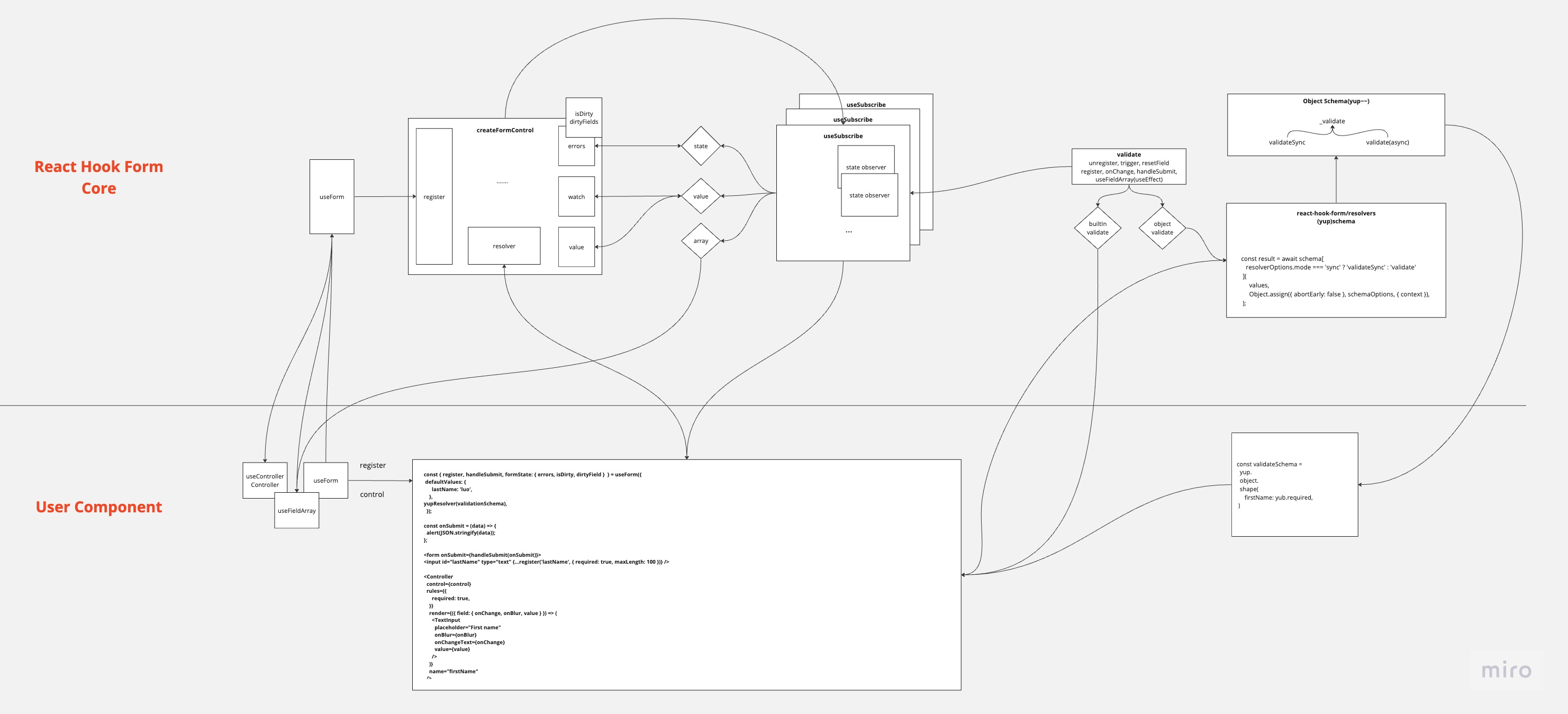
Creating the Form object
There are cases where, after setting data in useForm for the first time and setting defaultValues, changing it again afterward does not take effect. As shown in the code below, because useRef sets defaultValues only when it is created for the first time, the change was not being applied.
To resolve this issue, the design should be arranged so that useForm is called only after the data has been fetched.
const _formControl = React.useRef<
  UseFormReturn<TFieldValues, TContext, TTransformedValues> | undefined
>();

const [formState, updateFormState] = React.useState<FormState<TFieldValues>>({
  isDirty: false,
  isValidating: false,
  isLoading: isFunction(props.defaultValues),
  isSubmitted: false,
  isSubmitting: false,
  isSubmitSuccessful: false,
  isValid: false,
  submitCount: 0,
  dirtyFields: {},
  touchedFields: {},
  errors: {},
  defaultValues: isFunction(props.defaultValues)
    ? undefined
    : props.defaultValues,
});

if (!_formControl.current) {
  _formControl.current = {
    ...createFormControl(props, () =>
      updateFormState(formState => ({ ...formState })),
    ),
    formState,
  };
}

const control = _formControl.current.control;
control._options = props;

export function useSubscribe<T>(props: Props<T>) {
  const _props = React.useRef(props);
  _props.current = props;

  React.useEffect(() => {
    const subscription =
      !props.disabled &&
      _props.current.subject &&
      // 최초 구독 처리하고 2번째 인자로 넘어온 함수를 실행한다.
      _props.current.subject.subscribe({
        next: _props.current.next,
      });

    return () => {
      subscription && subscription.unsubscribe();
    };
  }, [props.disabled]);
}

useSubscribe({
  // form 전체에 대한 상태값 관리하는 객체
  subject: control._subjects.state,
  //
  next: (
    value: Partial<FormState<TFieldValues>> & { name?: InternalFieldName },
  ) => {
    // 객체 생성 함수 로직에서 value 넘어온 value값을 구독한 지점에 업데이트(watch, register)
    if (
      // 생성한 폼 객체의 상태값을 변경하기 위한 함수
      shouldRenderFormState(
        value,
        control._proxyFormState,
        control._updateFormState,
        true,
      )
    ) {
      // 폼 객체의 상태값을 변경 이후에 useState 상태를 세팅함으로써 렌더링 되게 처리
      updateFormState({ ...control._formState });
    }
  },
});

React.useEffect(() => {
  // 서버에서 받아온 values 값을 업데이트 할 경우
  if (props.values && !deepEqual(props.values, _values.current)) {
    control._reset(props.values, control._options.resetOptions);
    _values.current = props.values;
  } else {
    // 기본값일 경우에는 디폴트 밸류 함수로 세팅한다.
    control._resetDefaultValues();
  }
}, [props.values, control]);

React.useEffect(() => {
  if (!control._state.mount) {
    // 최초 1회 form 객체 생성(createFormControl)
    control._updateValid(); // 유효성 체크
    control._state.mount = true; // form 생명주기 상태값으로 mount 처리
  }

  if (control._state.watch) {
    // watch 모드가 세팅 될 경우
    control._state.watch = false; // watch  모드 끄고
    control._subjects.state.next({ ...control._formState }); // useSubscribed 훅의 next를 실행
  }

  // element name 값으로 엘리먼트의 상태값을 관리 중 unMount가 있는경우 제거한다.(option.shouldUnregister 세팅된 경우)
  control._removeUnmounted();
});

// useState를 통해서 변경된 데이터를 내부 폼 전체 객체 상태값을 업데이트(상태값을 ref에 저장)
_formControl.current.formState = getProxyFormState(formState, control);

// 컴포넌틀는 리랜더링 하더라도 useRef의 최신 상태값을 얻어오도록 ref에 current값을 리턴한다.
return _formControl.current;
The logic that creates the Form object once on first run (createFormControl)
Let me explain the createFormControl function.
props passes through the props argument of useForm.
const defaultOptions = {
  mode: VALIDATION_MODE.onSubmit,
  reValidateMode: VALIDATION_MODE.onChange,
  shouldFocusError: true,
} as const;

export function createFormControl<
  TFieldValues extends FieldValues = FieldValues,
  TContext = any,
>(
  props: UseFormProps<TFieldValues, TContext> = {},
  flushRootRender: () => void,
): Omit<UseFormReturn<TFieldValues, TContext>, 'formState'> {}

// 기본 값을 세팅
let _defaultValues =
  isObject(_options.defaultValues) || isObject(_options.values)
    ? cloneObject(_options.defaultValues || _options.values) || {}
    : {};

// formValues 값을 세팅
let _formValues = _options.shouldUnregister // unmount 될 경우 입력데이터 손실처리
  ? {}
  : cloneObject(_defaultValues);

// form 생명주기 상태값을 관리
let _state = {
  action: false,
  mount: false,
  watch: false,
};

// element name 값으로 엘리먼트의 상태값을 관리
let _names: Names = {
  mount: new Set(), // register, unregister 실행 시 name 값을 map으로 관리
  unMount: new Set(),
  array: new Set(),
  watch: new Set(),
};

// form 전체에 대한 상태값 관리
const _proxyFormState = {
  isDirty: false,
  dirtyFields: false,
  touchedFields: false,
  isValidating: false,
  isValid: false,
  errors: false,
};

// 옵저버 패턴 객체 생성
const _subjects: Subjects<TFieldValues> = {
  values: createSubject(),
  array: createSubject(),
  state: createSubject(),
};

// 사용자의 인터렉션에 대해서만 dirty 세팅(DirtyFields and isDirty)
const shouldCaptureDirtyFields =
  props.resetOptions && props.resetOptions.keepDirtyValues;

// 제출 이전, 이후에 유효성 체크 로직 분리
const validationModeBeforeSubmit = getValidationModes(_options.mode);
const validationModeAfterSubmit = getValidationModes(_options.reValidateMode);
register
const register: UseFormRegister<TFieldValues> = (name, options = {}) => {
  // <input type="radio" {...register('radio')} value="1" />
  // element name값을 fields로 관리
  let field = get(_fields, name);
  const disabledIsDefined = isBoolean(options.disabled);

  // register 실행 후에 _fileds에서 name, mount: true, options값을 세팅
  set(_fields, name, {
    ...(field || {}),
    _f: {
      ...(field && field._f ? field._f : { ref: { name } }),
      name,
      mount: true,
      ...options,
    },
  });

  // 마운트된 name값을 관리
  _names.mount.add(name);

  // 이미 element name이 있는경우
  //   <input type="radio" {...register('radio')} value="1" />
  //   <input type="radio" {...register('radio')} value="2" />
  //   <input type="radio" {...register('radio')} value="3" />
  if (field) {
    _updateDisabledField({
      field,
      disabled: options.disabled,
      name,
    });
  } else {
    updateValidAndValue(name, true, options.value);
  }
};-
_updateDisabledField: a function that updates the field when the disabled attribute is present
// _updateDisabledField const _updateDisabledField: Control<TFieldValues>['_updateDisabledField'] = ({ disabled, name, field, fields, }) => { // disabled 속성이 있는 경우 element값을 undefine로 채운다. if (isBoolean(disabled)) { const value = disabled ? undefined : get( _formValues, name, getFieldValue(field ? field._f : get(fields, name)._f), ); set(_formValues, name, value); updateTouchAndDirty(name, value, false, false, true); } }; -
_updateValid: a function that fetches the form's validity and updates it
const _updateValid = async (shouldUpdateValid?: boolean) => { // form 전체 유효한 경우, 강제 유효성 검증을 해야할 경우 if (_proxyFormState.isValid || shouldUpdateValid) { // resolver가 있는경우 const isValid = _options.resolver ? isEmptyObject((await _executeSchema()).errors) : await executeBuiltInValidation(_fields, true); // if (isValid !== _formState.isValid) { _subjects.state.next({ isValid, }); } } }; -
updateValidAndValue: a function that updates the value and checks validity
// updateValidAndValue const updateValidAndValue = ( name: InternalFieldName, shouldSkipSetValueAs: boolean, value?: unknown, ref?: Ref, ) => { // element에 name 키값으로 내부의 _fields 값을 얻어옴 const field: Field = get(_fields, name); if (field) { // 초기에 값을 얻어오는 로직 const defaultValue = get( _formValues, name, isUndefined(value) ? get(_defaultValues, name) : value, ); // 초기값 X or defaultChecked(radio, checkbox) // setValue 무시여부 isUndefined(defaultValue) || (ref && (ref as HTMLInputElement).defaultChecked) || shouldSkipSetValueAs ? set( _formValues, name, shouldSkipSetValueAs ? defaultValue : getFieldValue(field._f), ) : setFieldValue(name, defaultValue); // 마운트될 경우 유효성 체크하도록 처리 _state.mount && _updateValid(); } }; -
updateTouchAndDirty: a function that updates isDirty and dirtyFields when a field value changes
const updateTouchAndDirty = (
  name: InternalFieldName,
  fieldValue: unknown,
  isBlurEvent?: boolean,
  shouldDirty?: boolean,
  shouldRender?: boolean,
): Partial<
  Pick<FormState<TFieldValues>, 'dirtyFields' | 'isDirty' | 'touchedFields'>
> => {
  let shouldUpdateField = false;
  let isPreviousDirty = false;
  const output: Partial<FormState<TFieldValues>> & { name: string } = {
    name,
  };

  if (!isBlurEvent || shouldDirty) {
    // 폼 전체 상태값 isDirty이 true일 경우에만 dirty가 세팅된다.
    if (_proxyFormState.isDirty) {
      isPreviousDirty = _formState.isDirty;
      _formState.isDirty = output.isDirty = _getDirty();
      shouldUpdateField = isPreviousDirty !== output.isDirty;
    }

    const isCurrentFieldPristine = deepEqual(
      get(_defaultValues, name),
      fieldValue,
    );

    isPreviousDirty = get(_formState.dirtyFields, name);
    // setValue를 통해서 shouldDirty값이 true일 경우 dirtyfields가 호출되고
    // 코드를 통해서 업데이트 할 경우 isDirty, dirtyFields값이 상이할 수 있다.
    isCurrentFieldPristine
      ? unset(_formState.dirtyFields, name)
      : set(_formState.dirtyFields, name, true);
    output.dirtyFields = _formState.dirtyFields;
    shouldUpdateField =
      shouldUpdateField ||
      (_proxyFormState.dirtyFields &&
        isPreviousDirty !== !isCurrentFieldPristine);
  }

  if (isBlurEvent) {
    const isPreviousFieldTouched = get(_formState.touchedFields, name);

    if (!isPreviousFieldTouched) {
      set(_formState.touchedFields, name, isBlurEvent);
      output.touchedFields = _formState.touchedFields;
      shouldUpdateField =
        shouldUpdateField ||
        (_proxyFormState.touchedFields &&
          isPreviousFieldTouched !== isBlurEvent);
    }
  }

  shouldUpdateField && shouldRender && _subjects.state.next(output);

  return shouldUpdateField ? output : {};
};
inside resolver
resolver summary
While it is possible to validate each field through a builtin schema (register: required, min, max, minLength, maxLength.., control: rule), using an object schema through a resolver allows you to consolidate and manage the schema as a single unit, and because it can be extended to fit the characteristics of each schema plugin, react-hook-form resolvers are sometimes used.
Usage example
// resolver: 선호하는 스키마 라이브러리의 유효성 검증 로직 통합을 위해서 사용
// context: 스키마 라이브러리에서 사용하기 위한 전역 객체
// getResolverOptions: resolver options 값을 주입해주기 위한 함수

// builtin schema 사용
<form onSubmit={handleSubmit(onSubmit)}>
  <input
    {...register('firstName', { required: true })}
    placeholder="firstName"
  />
  {errors.firstName && <p>firstName error</p>}
</form>;

// resolver schema 사용(yup 사용 예)
const validationSchema = yup
  .object()
  .shape(
    {
      firstName: yup
        .string()
        .required()
        .when('$type', (type, schema) => {
          console.log(type);
          if (type === 'one') {
            return schema.required();
          }
          return;
        }),
    },
    [['exclusivelyRequiredOne', 'exclusivelyRequiredTwo']],
  )
  .required();

let dynamicValue = condition ? 'one' : 'two';
const {
  control,
  register,
  handleSubmit,
  formState: { errors },
} = useForm<{
  firstName: string;
}>({
  // resolver: 선호하는 스키마 라이브러리의 유효성 검증 로직 통합을 위해서 사용
  resolver: yupResolver(validationSchema),
  mode: mode as keyof ValidationMode,
  context: { type: 'one' },
});

<form onSubmit={handleSubmit(onSubmit)}>
  <input {...register('firstName')} placeholder="firstName" />
  {errors.firstName && <p>firstName error</p>}
</form>;
resolver explanation
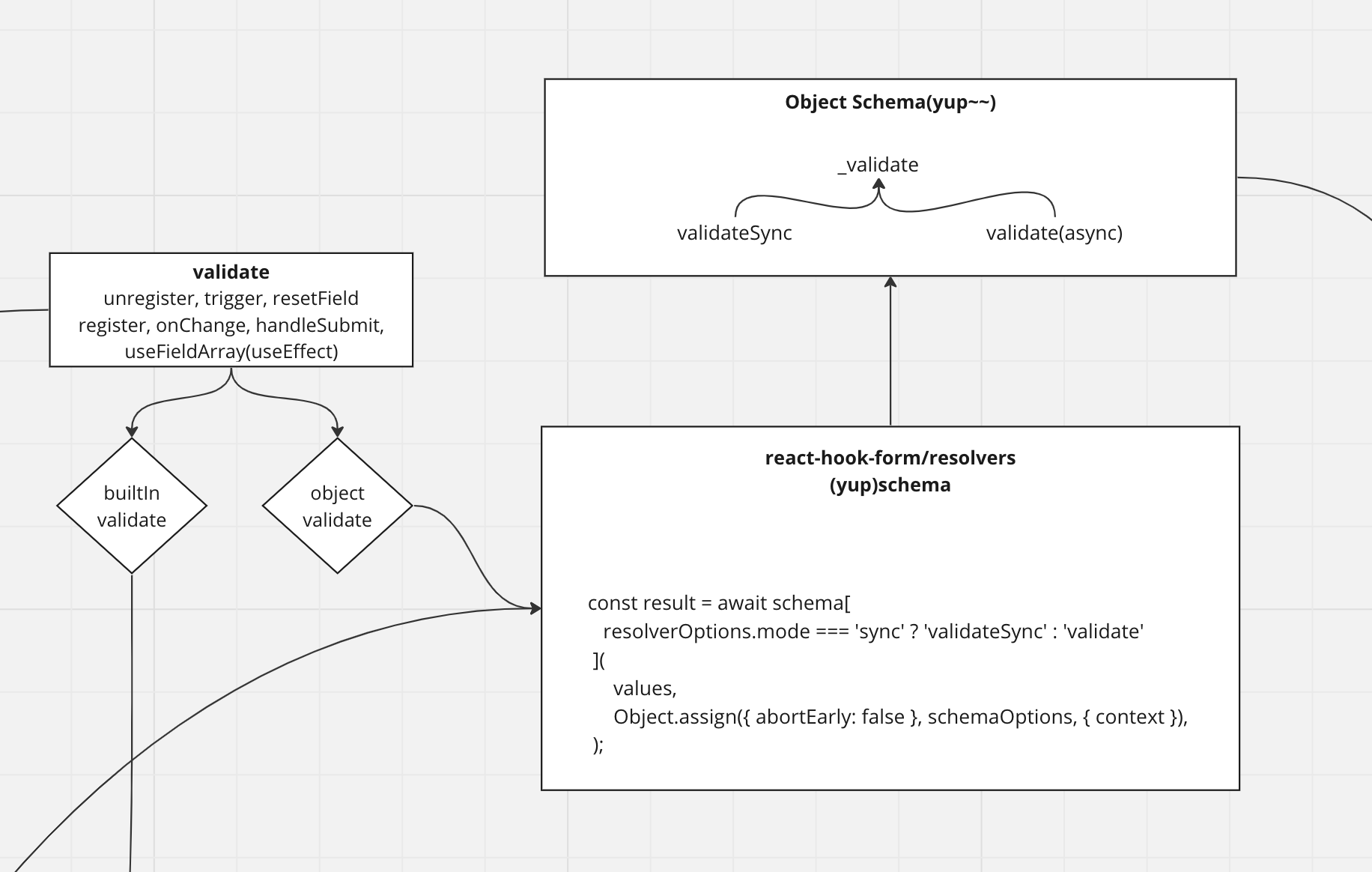
- If you were to implement a custom resolver directly..
import { Resolver, FieldError } from 'react-hook-form';
import get from 'lodash/get';

export interface FormData {
  name: string;
  city: string;
  street: string;
}

function validateLength(
  name: string,
  value: any,
  errors: Record<string, FieldError>,
) {
  if (!value || value.length < 6) {
    return {
      ...errors,
      [name]: {
        type: `min-length-${minLength}`,
        message: `The field "${name}" must be at least ${minLength} chars`,
      },
    };
  }

  return errors;
}

export const customResolver: Resolver<FormData> = (
  values,
  _context,
  { names },
) => {
  let errors = {};
  if (names) {
    // Validate only changed fields
    errors = names.reduce((acc, name) => {
      const value = get(values, name);

      return validateLength(name, value, acc);
    }, {});
  } else {
    // Validate all fields on submit event
    errors = Object.entries(values).reduce(
      (acc, [name, value]) => validateLength(name, value, acc),
      {},
    );
  }

  return { values, errors };
};

const {
  register,
  handleSubmit,
  formState: { errors },
} = useForm<FormData>({
  mode: 'onChange',
  resolver: customResolver,
});- Resolvers supported by react-hook-form (14 in total)
https://github.com/react-hook-form/resolvers#yup
- Comparison of validation libraries supported by react-hook-form
- ajv
- AJV validates data using JSON schema, which can be done in various languages.
- It has a large community with around 12,000 stars on Github and around 85 million npm downloads per week.
- AJV is currently the fastest json schema validator library according to json-schema-benchmarks.
- joi
- It offers the largest community and support, with around 19,000 stars on Github.
- Its bundle size is around 149kb minified.
- It is built more for the server side and is recommended when working on the server side.
- Joi has a very large API, and it is well documented, which shortens the learning curve.
- yup
- Its Schema is similar to Joi and follows a similar approach.
- It is mainly used on the client side and supports client-side validation.
- It has a ~60kb minified bundle size. This is lower than AJV and Joi, but larger than Zod.
- Yes, it supports static type inference, but it does not necessarily match TypeScript.
- zod
- zod supports static type inference and works well with TypeScript.
- Its bundle size is around 45kb.
- ajv
inside resolver
inside resolver initialize
const validationSchema = yup
  .object()
  .shape(
    {
      firstName: yup
        .string()
        .required()
        .when('$type', (type, schema) => {
          console.log(type);
          if (type === 'one') {
            return schema.required();
          }
          return;
        }),
    },
    [['exclusivelyRequiredOne', 'exclusivelyRequiredTwo']],
  )
  .required();

const {
  control,
  register,
  handleSubmit,
  formState: { errors },
} = useForm<{
  firstName: string;
}>({
  resolver: yupResolver(validationSchema),
  mode: mode as keyof ValidationMode,
  context: { type: 'one' },
});

// react-hook-form/resolvers/blob/master/yup/src/yup.ts
// useForm에 yupResolver 함수 호출 후 기본 인자값을 세팅
// schema: 사용자가 선언한 외부 통합을 위한 라이브러리 schema
// schemaOptions: 외부 라이브러리 초기 옵션
// resolverOptions: 동기/비동기 모드
export const yupResolver: Resolver =
  (schema, schemaOptions = {}, resolverOptions = {}) =>
  async (values, context, options) => {
    try {
      if (schemaOptions.context && process.env.NODE_ENV === 'development') {
        // eslint-disable-next-line no-console
        console.warn(
          "You should not used the yup options context. Please, use the 'useForm' context object instead",
        );
      }

      const result = await schema[
        resolverOptions.mode === 'sync' ? 'validateSync' : 'validate'
      ](
        values,
        Object.assign({ abortEarly: false }, schemaOptions, { context }),
      );

      // 브라우저 기본 유효성 검사를 사용할지 여부를 설정이 있는경우 네이티브 유효성도 같이 검증
      options.shouldUseNativeValidation && validateFieldsNatively({}, options);

      return {
        values: result,
        errors: {},
      };
    } catch (e: any) {
      if (!e.inner) {
        throw e;
      }

      return {
        values: {},
        errors: toNestError(
          parseErrorSchema(
            e,
            !options.shouldUseNativeValidation &&
              options.criteriaMode === 'all',
          ),
          options,
        ),
      };
    }
  };
inside resolver validation check
- Call path
- unregister, triggeer, resetField > _updateValid > _executeSchema
- register > updateValidAndValue > _updateValid > _executeSchema
- onChange, handleSubmit, useFieldArray(useEffect) > _executeSchema
// unregister, triggerm, resetField > _updateValid > _executeSchema
// register > updateValidAndValue > _updateValid > _executeSchema
// onChange, handleSubmit, useFieldArray(useEffect) > _executeSchema
const _executeSchema = async (
  name?: InternalFieldName[], // name 값이 없는경우 전체 스키마를 검사
) =>
  _options.resolver!(
    _formValues as TFieldValues, // { fieldName: fieldValue -> firstName: HONG)
    _options.context, // resolver schema에 주입을 위한 용도
    getResolverOptions(
      // resolver options 값을 주입해주기 위한 함수
      name || _names.mount, // name 있는경우: 특정 필드, _names.mount: 마운트 된 필드에 키값을 배열로 넘김
      _fields, // 마운트된 필드의 dom 엘리먼트, 네임을 저장하는 set 객체
      _options.criteriaMode, // 기준모드: 모든 유효성 검사 오류를 전체 표시, 한번에 하나씩 표기
      _options.shouldUseNativeValidation, // 브라우저 기본 유효성 검사를 사용할지 여부를 설정합니다. false로 설정하면 React Hook Form의 내장 유효성 검사를 사용합니다.
    ),
  );