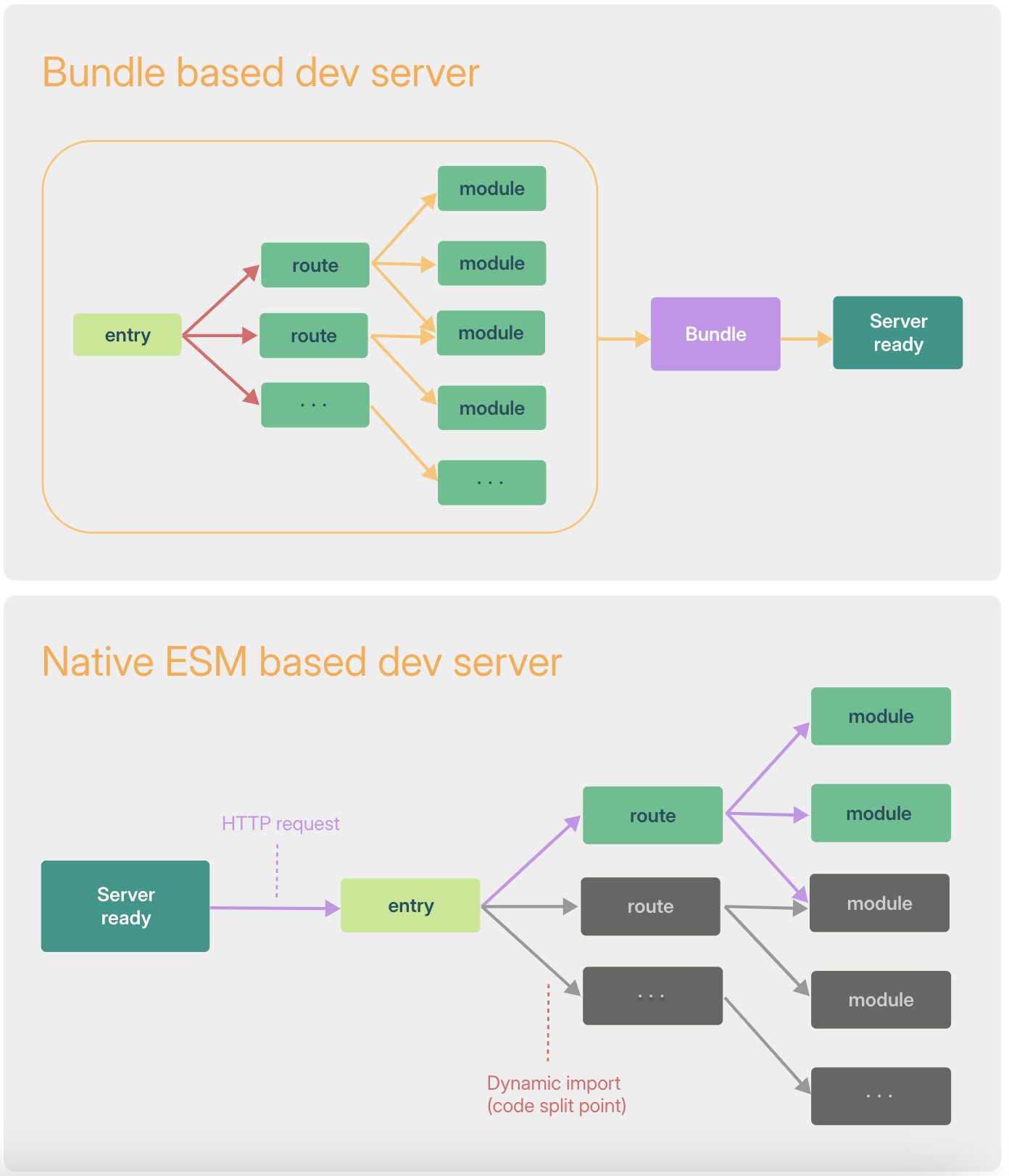
Before browsers natively supported ES Modules (Native ESM), JavaScript modularization could not be handled at the browser level. To support such source modules in the browser, we had to merge multiple files or group them into meaningful units using modularization syntax such as require/IIFE/import/export. This is called bundling, and today Webpack, Rollup, and Parcel are the tools that provide it.
However, as applications grew increasingly sophisticated, JS tools began to hit performance bottlenecks. Even with HMR, applying changed files could take several seconds, which hurt developer productivity.
ESM (ECMAScript Modules)
ESM refers to a module approach in which the modularization syntax import and export can be handled by the browser itself, without any separate tooling. If you run code like the following in a browser without a bundler such as Webpack, an error occurs.
// app.jsimport { sum } from 'test.js'console.log(sum(1,2));<script src="app.js></script>
In the past, browsers had no ability to interpret import and export, but now, by adding an attribute as shown below, the browser can handle import and export.
<script type="module" src="app.mjs></script>
Vite's Characteristics
Performance improvements for cold-start dev server startup
Dependencies: Provides a pre-bundling feature using esbuild for source code whose contents do not change, such as node_modules
esbuild delivers speeds 10-100x faster than traditional bundlers like webpack and parcel
esbuild pre-bundles all packages in node_modules and serves and caches them as shown below
// Dependencies package import 할 경우import dayjs from 'dayjs';// vite esm 지원을 위한 변환/캐싱/node_modules/.vite/deps/dayjs.js?v=b09621d8
Source code: Applies the Native ESM approach so the browser imports, transforms, and serves modules directly
HMR performance improvements
With traditional bundlers, changing source code required re-running the entire bundling process, which caused slow performance. By using the Native ESM approach and swapping only the changed module, performance is improved.
It also leverages HTTP headers to improve page load speed (minimizing the number of requests).
304 Not Modified: Uses the client cache
Cache-Control: Uses caching via max-age=31536000, immutable
Uses Rollup in production
Although esbuild boasts the fastest performance, its ecosystem is still lacking and its stability for browser bundling is considered weaker, so Vite uses the Rollup bundler in production (providing performance benefits such as tree shaking, lazy loading, and file splitting).
Rollup switched its parser to SWC in v4, and work is underway to build Rolldown, a Rust port. Once development is complete, it will be able to fully replace esbuild (with the goal of eliminating the mismatch between development and build).
Remove CRA package for Vite
Remove the packages used in the existing CRA environment.
If there is an already-installed node_modules folder, delete the folder itself.
Setting the Stage with Vite Installationvite: A modern web project build tool
@vitejs/plugin-react: @vitejs/plugin-react adds the configuration needed to use React with Vite, supporting fast development and bundling of React applications
vite-tsconfig-paths: Enables the path aliases configured in the tsconfig.json file to also be applied in Vite. With vite-tsconfig-paths, the path aliases defined in the TypeScript configuration are recognized by Vite as well and can be used when resolving module paths
vite-plugin-svgr
A Vite plugin that converts SVGs into React components
However, installing a version later than 3.3.0 causes build and type errors (with 3.3.0 you can convert an SVG to a React component as shown below)
import { ReactComponent as ChannelLogo } from '../../assets/artwork-illust-pm-assign-info-channel-talk.svg';
vite-plugin-checker
A plugin that provides multiple checking capabilities in Vite-based projects, including type checking, ESLint, and VLS (Volar Language Server)
Because it runs checks asynchronously, it has the advantage of not affecting the dev server's loading speed.
yarn add vite @vitejs/plugin-react vite-tsconfig-paths vite-plugin-svgr@3.3.0

yarn add vite-plugin-checker -D
If you do not delete the index.html in the public path, Vite will pre-load public/index.html when loading the development environment, so be sure to move it to the root!!
mv public/index.html .
Add module script to the bottom of the body tag
Specify the code entry point for the initial load.
<body> {/* others here */} <script type="module" src="/src/index.tsx"></script></body>
Update tsconfig.json
Reasons to use isolatedModules
Isolating dependencies between modules: Ensures each module does not depend on the types of others, so modules are processed individually at compile time. This can reduce TypeScript's compilation time.
Performance improvement: Compiling modules independently means only the modules that changed are recompiled, improving overall compilation speed.
ESM compatibility: Increases compatibility with ES modules, providing better results when integrating with various build tools.
Preventing check errors: Since every module is checked individually, a type error in one module is prevented from affecting other modules.
Configure the vite.config.js path in include.
Add module html minify
In a CRA project, HTML minification is handled through the built-in HtmlWebpackPlugin, but since Vite does not include it, you need to install it yourself and add the configuration.
// <root>/vite.config.jsimport { defineConfig, loadEnv } from 'vite';import path from 'path';import react from '@vitejs/plugin-react';import viteTsconfigPaths from 'vite-tsconfig-paths';import svgr from 'vite-plugin-svgr';import { createHtmlPlugin } from 'vite-plugin-html';import checker from 'vite-plugin-checker';export default defineConfig(config => { const env = loadEnv(config.mode, process.cwd(), ''); return { build: { outDir: 'build', // build 폴더명 변경(기본 dist) target: 'es2015', // es6 target transpile sourcemap: false, // 소스맵 생성 여부 rollupOptions: { output: { manualChunks(id) { // chunks 파일을 만들 경우 아래와 같이 청크명과 필터를 걸어주세요. if (id.includes('/react')) { return 'venders'; } }, }, onwarn(warning, defaultHandler) { // sourcemap: true 설정할 경우 node_modules에 소스맵 없는 경우에 대한 경고 무시를 위해 추가 if (warning.code === 'SOURCEMAP_ERROR') { return; } defaultHandler(warning); }, }, }, define: { global: 'globalThis', // 글로벌 객체를 빈 객체로 대체(global is not defined error 에러에 대한 방어코드) }, plugins: [react(), viteTsconfigPaths(), svgr()], };});
Environment Variables
If you do not set the VITE prefix, you cannot retrieve the value from import.meta.env.
By default it provides the property values DEV (vite) and PROD (vite build), so you can distinguish between the development and build environments.
ChangeEnv Variables and Modes
// .env Files.env # loaded in all cases.env.local # loaded in all cases, ignored by git.env.[mode] # only loaded in specified mode.env.[mode].local # only loaded in specified mode, ignored by git// Modes# .env.production.liveVITE_ENVIRONMENT=live// command mode option flag"build:dev": "yarn vite --mode production.dev","build:rc": "yarn vite --mode production.rc","build:live": "yarn vite --mode production.live",
Add module vite-plugin-checker
In a CRA environment, type checking is handled asynchronously internally via the fork-ts-checker-webpack-plugin, but in a VITE environment you need to install vite-plugin-checker directly and add it to the vite.config.js configuration.
import.meta.glob dynamic load
You can use Vite's import.meta.glob to dynamically import all icons.
const icons = import.meta.glob('./*Icon.tsx');const iconComponentPath = './aIcon.tsx';const Icon = icons && icons[iconComponentPath as string] ? lazy( () => icons[iconComponentPath as string]() as Promise<{ default: ComponentType; }>, ) : null;
sass-resources-loader(dart sass) → vite config preprocessorOptions.sass
sass-resources-loader, which is used to apply commonly used styles globally, can be replaced in Vite with preprocessorOptions.sass.
// CRArules: [ { test: /\\.scss$/, use: [ { loader: 'sass-resources-loader', options: { resources: [ path.resolve(__dirname, './sass.scss'), ], }, }, ], include: path.resolve(__dirname, './src'), exclude: /node_modules/, },]// vite.config.jscss: { preprocessorOptions: { scss: { // Next line will prepend the import in all you scss files as you did with your vite.config.js file additionalData: ` @import "./sass.scss"; `, }, },},
Summary of error cases by step
The "@forward rules must be written before any other rules" error
Fix it so that the @forward statement is placed above all other rules (@import, @use, style declarations)
@forward
Part of the Sass module system introduced in Dart Sass, it plays an important role in structuring and managing modularized stylesheets.
Unlike the @import approach, @forward makes it easier to manage the modularization and reusability of Sass code.
@use: imports a module while using a namespace to prevent conflicts, and lets you explicitly import only the parts you need.
@import simply includes a file, which can be included multiple times and carries the risk of variable or mixin conflicts.
// reset.scss@forward 'reset';// ./sass.scss@use 'color';css: { preprocessorOptions: { scss: { // Next line will prepend the import in all you scss files as you did with your vite.config.js file additionalData: ` @forward 'reset'; @use './color.scss' as *; @use './sass.scss' as * `, }, },},
setting module scss name for Vite(optional)
In CRA, when using SCSS modules, a unique class name is automatically generated by combining the file name and the class name, but VITE follows a different rule where the name is generated from the class name only.
Rule: [filename][original class name][hash:base64:5]
However, if there is no case in your service where module scss is selected globally, there is no need to set this up. (Internally, if you do not configure it, the name is automatically changed to a unique value based on the [class name, hash].)
import styles from './Test.module.scss';const Test = () => { return ( <div className={styles.container}></div> );};export default Test;// 변경 전class="Test_container__28qL6"// 변경 후//// vite.config.jsconst namespaceUUID = v4();css: { ... modules: { // 파일명과 클래스명을 포함한 고유한 이름 생성 generateScopedName: (name, filename) => { // 파일 경로 기반 고유한 해시 생성 const file = path.basename(filename).replace('.module', '').replace(/\.[^/.]+$/, ''); // UUID 생성 후 Base64 인코딩 const hash = Buffer.from(v5(`${file}_${name}`, namespaceUUID)).toString('base64').slice(0, 5); return `${file}_${name}__${hash}`; }, },},
server(proxy, outside file)
The CRA proxy configuration can be replaced with the VITE proxy.
When accessing external folders/files outside the VITE environment, adding them to the fs.allow object makes them accessible from the dev server.
Previously proxy paths were managed as an array, but in Vite you have to manage each path individually.
external file link settings(alias)
In CRA, when accessing a path inside an external file (tsconfig.json), the path is resolved relative to the current project environment, but in VITE the path is accessed relative to the external file. This causes issues with alias handling, so you need to reassign it as an absolute path instead of a tsconfig path.
e.g.)
CRA(root)
Based on the location of the outside/index.tsx component
setting external file access permissions
In CRA, accessing external files came with the hassle of adding them to the ModuleScopePlugin in the internal config file, but in VITE external file access is unrestricted during the build process, while in the development environment you need to configure the external file paths.
Note that when configuring file paths, you must also configure internal file paths in addition to the external file paths.
fs: { // 허용할 디렉터리 추가 (여기에 외부 파일 경로를 추가) allow: [ '../outside', '/' ],},
setting baseurl for Vite
In CRA, resource paths are set internally based on the BaseURL (PUBLIC_URL), but in VITE you need to change that path to the base property value. (Specify the base url path in an env variable.)
However, in the DEV environment you should use the internal resource path, so do not specify a path.
Add the Storybook packages for Vite integration.
In the existing CRA environment, using the @storybook/react package command worked fine, but with VITE you use the @storybook/react-vite package and need to install the storybook package additionally.
Also, if you use version 6 of the Storybook integration packages, you will encounter an error like 'storybook-channel-mock.js:7 Uncaught TypeError: import_channels.default is not a constructor'.
Be sure to install the latest packages, version 8 or higher.
// CRA - @storybook/react"storybook": "start-storybook -p 9009 -s public",// VITE - @storybook/vitestaticDirs: ['../public'], // 이전 버전(v6) -s public 옵션과 동일
webpackFinal → ViteFinal migration
Preprocess scss and set up the allowed file paths
// webpackconfig.module.rules.push({ test: /\.scss$/, use: [ { loader: 'sass-resources-loader', options: { resources: [path.resolve(__dirname, '../sass.scss')], }, }, ], include: path.resolve(__dirname, '../src'), exclude: /node_modules/,});// Viteconst { mergeConfig } = await import('vite');return mergeConfig(config, { // Merge custom configuration into the default config const { mergeConfig } = await import('vite'); css: { preprocessorOptions: { scss: { // Next line will prepend the import in all you scss files as you did with your vite.config.js file additionalData: ` @forward 'reset'; @use './color.scss' as *; @use './sass.scss' as * `, }, }, },
External file access
// VITEserver: { fs: { // 허용할 디렉터리 추가 (여기에 외부 파일 경로를 추가) allow: [ '../outside', '/' ], },},
storybook code migration processingNo longer inferring default values of args(v6.3)
With the version update, you can no longer set default values in argTypes; they are now set in args instead. It does not cause a build error, but if you check, you will find that undefined ends up being set, so be sure to change it during migration.
Fast performance: esbuild-based, so tests run faster than Jest. (jest: Babel)
ESM support: Natively supports modern ES modules. (Jest can support the ES approach, but compatibility issues arise)
TypeScript integration: Integrates naturally with TypeScript without additional configuration.
Simple mocking API: Provides intuitive and easy-to-use mocking features.
Compatibility with Vite: Reuses your Vite configuration and plugins as-is.
Modern features: Supports HMR and a fast watch mode.
Small learning curve: Configuration familiar to Vite users.
Excellent developer experience: Modern and detailed error reporting and test feedback.
Installation
yarn add -D vitest jsdom @testing-library/dom @testing-library/jest-dom @testing-library/react @testing-library/user-event// Remove existing Jest test-related packagesyarn remove jest babel-jest
setting
Migrate the test configuration set up in package.json/jest.setup.js to vitest.config.js.
// 변경 전//// package.json"jest": { "collectCoverageFrom": [ "!<rootDir>/node_modules/" ], "moduleNameMapper": { "lodash-es": "lodash", }, "transformIgnorePatterns": [ "/node_modules/", ], "setupFilesAfterEnv": [ "<rootDir>/jest.setup.js" ]},// 변경 후//// vitest.config.jsexport default defineConfig({ resolve: { alias: { "lodash-es": "lodash", }, }, plugins: [ react(), viteTsconfigPaths(), // tsconfig 파일 패스 연동 ], test: { environment: 'jsdom', // React 테스트 환경을 위해 설정 globals: true, // Jest와 동일한 글로벌 변수를 사용 setupFiles: './src/setupTests.ts', // setup 파일 },});// src/setupTest.tsimport '@testing-library/jest-dom';
To run tests in your existing React test environment, be sure to set the test environment. (Add vitest to your TypeScript types.)
Add vitest to your TypeScript types.
Jest hooks run synchronously, whereas Vitest runs them in parallel by default. However, to run hooks synchronously, you must set the sequence.hooks property.
Types
Because Vitest does not support namespace properties, you must import the types directly.
// 변경 전let fn: jest.Mock<(name: string) => number>;// 변경 후import type { Mock } from 'vitest';let fn: Mock<(name: string) => number>;
Timeout
// 변경 전jest.setTimeout(5_000);// 변경 후vi.setConfig({ testTimeout: 5_000 });
package.json test commands
"test": "vitest","test:run": "vitest run",
MSW Migration Guide
Using Vitest tests together with msw version 0.43.1 produces an error like the one below
This is presumed to be an error caused by the fact that Vitest supports ECMAScript modules while older versions of msw do not (fixed by upgrading to the latest version)
vitest Package subpath './lib' is not defined by "exports" in node_modules/headers-polyfill/package.json
Installation
As you upgrade msw to the latest version, you must upgrade the storybook-addon used in Storybook accordingly.
The Storybook configuration related to msw-storybook-addon is the same as before.
yarn add -D msw@2.4.11 msw-storybook-addon@2.0.3
msw code migration processingworker-imports
// 변경 전import { setupWorker } from 'msw';// 변경 후import { setupWorker } from 'msw/browser';
Response resolver arguments
// 변경 전rest.get('/resource', (req, res, ctx) => {});// 변경 후import { http } from 'msw';http.get('/resource', ({ request }) => { const url = new URL(request.url); const productId = url.searchParams.get('id');});
Response declaration
// 변경 전rest.get('/resource', (req, res, ctx) => { return res(ctx.status(200), ctx.json({ id: 'abc-123' }));});// 변경 후import { http } from 'msw';http.get('/resource', () => { return new Response(JSON.stringify({ id: 'abc-123' }), { headers: { 'Content-Type': 'application/json', }, });});// 변경 후 2import { http, HttpResponse } from 'msw';export const handlers = [ http.get('/resource', () => { return HttpResponse.json({ id: 'abc-123' }, { status: 200 }); }),];
Request params
// 변경 전rest.get('/post/:id', req => { const { id } = req.params;});// 변경 후import { http } from 'msw';http.get('/post/:id', ({ params }) => { const { id } = params;});
Request cookies
// 변경 전rest.get('/resource', req => { const { token } = req.cookies;});// 변경 후import { http } from 'msw';http.get('/resource', ({ cookies }) => { const { token } = cookies;});
Request Body
// 변경 전rest.post('/resource', req => { // The library would assume a JSON request body // based on the request's "Content-Type" header. const { id } = req.body;});// 변경 후import { http } from 'msw';http.post('/user', async ({ request }) => { // Read the request body as JSON. const user = await request.json(); const { id } = user;});
 In the past, browsers had no ability to interpret