react v19
Overview
React 19 introduces a number of new features and improvements that enhance the developer experience, simplify common patterns, and boost performance. Below is a summary along with the key changes and code examples.
What’s new in React 19
Actions
A common use case in React apps is to perform a data mutation and then update the state based on the response.
In the past, pending, state, and optimistic updates had to be managed sequentially as separate pieces of state, but with the introduction of Actions this can now be handled automatically.
-
Before Actions
function UpdateName({}) { const [name, setName] = useState(''); const [error, setError] = useState(null); const [isPending, setIsPending] = useState(false); const handleSubmit = async () => { setIsPending(true); const error = await updateName(name); setIsPending(false); if (error) { setError(error); return; } redirect('/path'); }; return ( <div> <input value={name} onChange={event => setName(event.target.value)} /> <button onClick={handleSubmit} disabled={isPending}> Update </button> {error && <p>{error}</p>} </div> ); } -
Support for using async functions
// Using pending state from Actions function UpdateName({}) { const [name, setName] = useState(''); const [error, setError] = useState(null); const [isPending, startTransition] = useTransition(); const handleSubmit = () => { startTransition(async () => { const error = await updateName(name); if (error) { setError(error); return; } redirect('/path'); }); }; return ( <div> <input value={name} onChange={event => setName(event.target.value)} /> <button onClick={handleSubmit} disabled={isPending}> Update </button> {error && <p>{error}</p>} </div> ); } -
useActionState: Handle common cases for Actions
- In earlier Canary versions this hook was named useFormState, and it has been renamed to useActionState
// Using <form> Actions and useActionState function ChangeName({ name, setName }) { const [error, submitAction, isPending] = useActionState( async (previousState, formData) => { const error = await updateName(formData.get('name')); if (error) { return error; } redirect('/path'); return null; }, null, ); return ( <form action={submitAction}> <input type="text" name="name" /> <button type="submit" disabled={isPending}> Update </button> {error && <p>{error}</p>} </form> ); } -
React DOM:
-
useFormStatus: React DOM: New hook A hook that lets you access information about a form without prop drilling through components
import { useFormStatus } from 'react-dom'; import action from './actions'; function Submit() { const status = useFormStatus(); return <button disabled={status.pending}>Submit</button>; } export default function App() { return ( <form action={action}> <Submit /> </form> ); } -
useOptimistic: New hook A hook for optimistically showing the final state while an asynchronous request is in progress
function ChangeName({ currentName, onUpdateName }) {
  const [optimisticName, setOptimisticName] = useOptimistic(currentName); // initial state

  const submitAction = async formData => {
    const newName = formData.get('name');
    setOptimisticName(newName); // set state
    const updatedName = await updateName(newName);
    onUpdateName(updatedName);
  };

  return (
    <form action={submitAction}>
      <p>Your name is: {optimisticName}</p>
      <p>
        <label>Change Name:</label>
        <input
          type="text"
          name="name"
          disabled={currentName !== optimisticName}
        />
      </p>
    </form>
  );
}
USE
-
useContext → use
- The usage is the same as useContext, but the distinguishing feature is that it can also be used inside conditional statements.
import { use } from 'react'; import ThemeContext from './ThemeContext'; function Heading({ children }) { if (children == null) { return null; } // This would not work with useContext // because of the early return. const theme = use(ThemeContext); return <h1 style={{ color: theme.color }}>{children}</h1>; } -
promise → use
- Just wrap the promise with use and wrap the parent with Suspense.
- As you can see in the code below, it lets you write concise code, so it looks like it could replace the async libraries you have been using.
import { use } from 'react'; function Comments({ commentsPromise }) { // `use` will suspend until the promise resolves. const comments = use(commentsPromise); return comments.map(comment => <p key={comment.id}>{comment}</p>); } function Page({ commentsPromise }) { // When `use` suspends in Comments, // this Suspense boundary will be shown. return ( <Suspense fallback={<div>Loading...</div>}> <Comments commentsPromise={commentsPromise} /> </Suspense> ); }- Additional notes
- How Suspense works How Suspense works
- throw Promise → componetDidCatch(Suspend) → pending, fullfiled, error
React Server Components and Server Actions
- Server Components An option that lets you pre-render components in an environment separate from the client application or the SSR server. One common misconception, though: the use server directive is only used in server actions, not in server components.
- Server Actions They let client components call asynchronous functions that execute on the server.
Improvements in React 19
-
forwardRef → ref is a prop
- Changed from the syntax of wrapping with forwardRef to pass ref, so that ref is passed as a regular prop
function MyInput({ placeholder, ref }) { return <input placeholder={placeholder} ref={ref} />; } //... <MyInput ref={ref} />; -
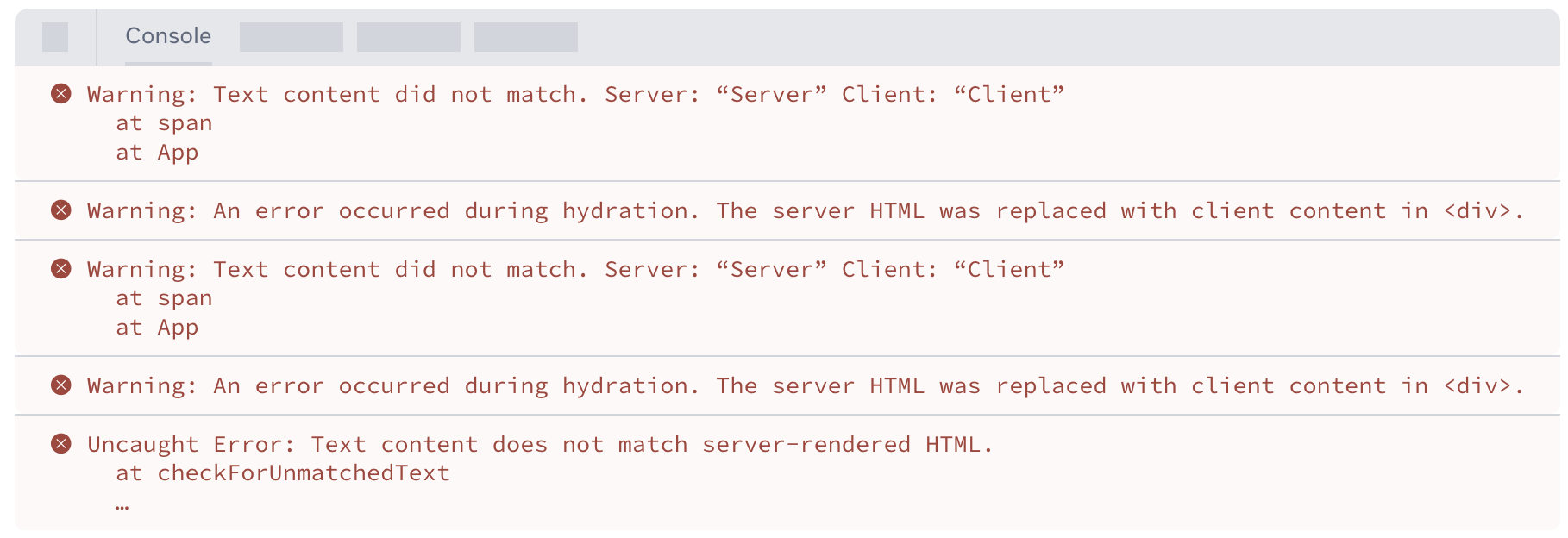
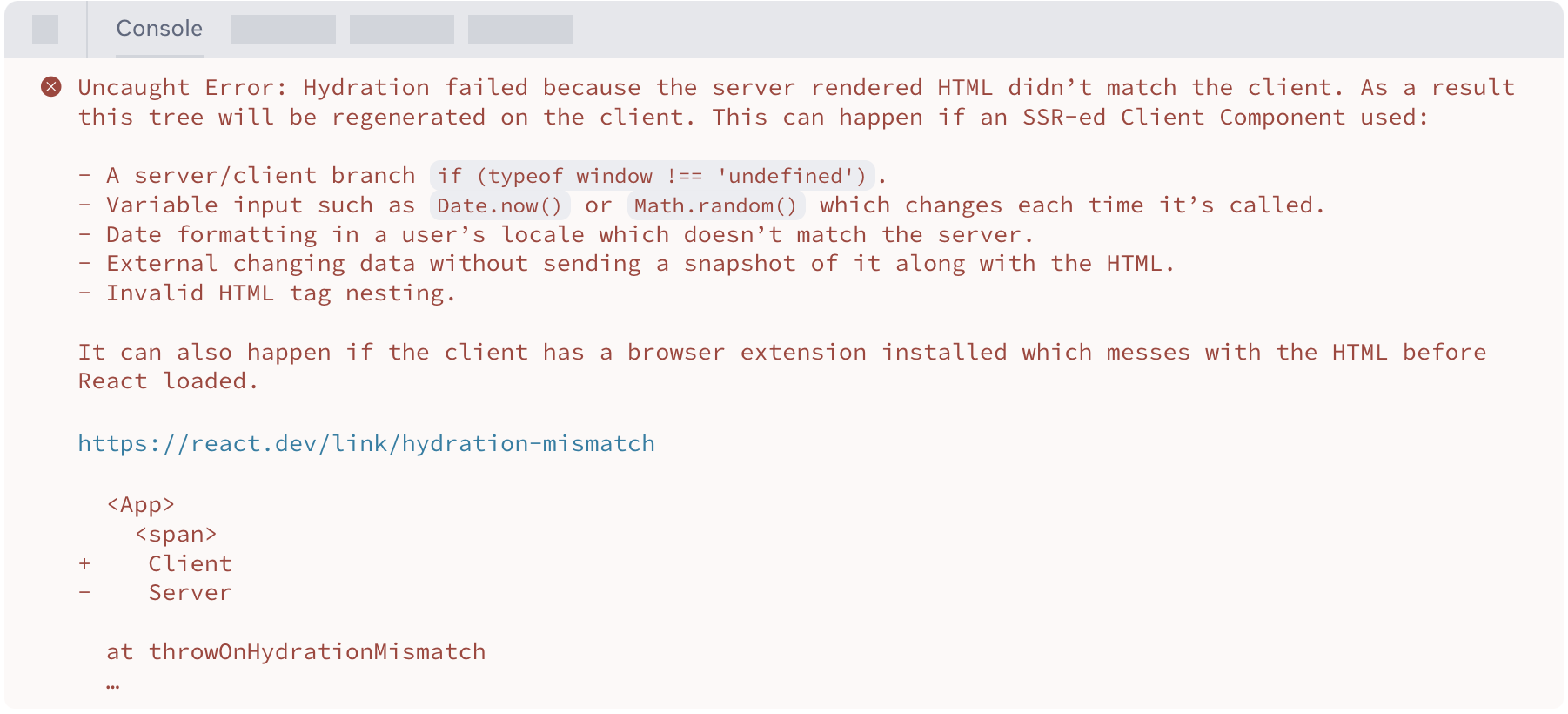
improved error reporting for hydration errors in react-dom Improved reporting of hydration errors, changed to a comparison of the mismatch and a single message
- Before
- After
- Before
-
as a provider Instead of using Context.Provider, it has been replaced with using Context directly. // < v19 const ThemeContext = createContext(''); function App({ children }) { return ( <ThemeContext.Provider value="dark">{children}</ThemeContext.Provider> ); } // >= v19 // < v19 const ThemeContext = createContext(''); function App({ children }) { return <ThemeContext value="dark">{children}</ThemeContext>; } -
Cleanup functions for refs A feature was added that calls a cleanup function on a ref when the component unmounts.
<input
  ref={ref => {
    // ref created

    // NEW: return a cleanup function to reset
    // the ref when element is removed from DOM.
    return () => {
      // ref cleanup
    };
  }}
/>
With the introduction of cleanup functions, returning anything else from a ref callback now produces a TypeScript error, so to resolve it you need to make sure the callback does not return a value.
-(<div ref={current => (instance = current)} />) + ( <div ref={current => { instance = current; }} /> ); -
useDeferredValue initial value It is now possible to set an initial value for useDeferredValue.
function Search({ deferredValue }) {
  // On initial render the value is ''.
  // Then a re-render is scheduled with the deferredValue.
  const value = useDeferredValue(deferredValue, '');

  return <Results query={value} />;
}
Support for Document Metadata
- Overview
Built-in support was added for rendering
<title>,<meta>, and metadata<link>tags anywhere in the component tree. It works in both server and client components, meaning that functionality pioneered by libraries such as React Helmet, which were already in use, has been brought in-house. However, if you need to override generic metadata with route-specific metadata based on the current path, you will still need to use a library such as React Helmet. - Example
function BlogPost({ post }) {
  return (
    <article>
      <h1>{post.title}</h1>
      <title>{post.title}</title>
      <meta name="author" content="Josh" />
      <link rel="author" href="https://twitter.com/joshcstory/" />
      <meta name="keywords" content={post.keywords} />
      <p>Eee equals em-see-squared...</p>
    </article>
  );
}
Support for stylesheets
-
Overview It provides built-in support for stylesheets, letting you set insertion priority through the precedence style attribute. Before the client-side rendering commit, it waits for added stylesheets and handles loading them according to their priority.
-
Example
function ComponentOne() {
  return (
    <Suspense fallback="loading...">
      <link rel="stylesheet" href="foo" precedence="default" />
      <link rel="stylesheet" href="bar" precedence="high" />
      <article class="foo-class bar-class">
        {...}
      </article>
    </Suspense>
  )
}

function ComponentTwo() {
  return (
    <div>
      <p>{...}</p>
      <link rel="stylesheet" href="baz" precedence="default" />  <-- will be inserted between foo & bar
    </div>
  )
}
Support for async scripts
-
Example
function MyComponent() {
  return (
    <div>
      <script async={true} src="..." />
      Hello World
    </div>
  )
}

function App() {
  <html>
    <body>
      <MyComponent>
      ...
      <MyComponent> // won't lead to duplicate script in the DOM
    </body>
  </html>
}
Support for preloading resources
-
Overview A feature was added that tells the browser, both on the initial document load and on client-side updates, about resources that should be loaded as early as possible.
-
Example
import { prefetchDNS, preconnect, preload, preinit } from 'react-dom' function MyComponent() { preinit('https://.../path/to/some/script.js', {as: 'script' }) // loads and executes this script eagerly preload('https://.../path/to/font.woff', { as: 'font' }) // preloads this font preload('https://.../path/to/stylesheet.css', { as: 'style' }) // preloads this stylesheet prefetchDNS('https://...') // when you may not actually request anything from this host preconnect('https://...') // when you will request something but aren't sure what } // result <!-- the above would result in the following DOM/HTML --> <html> <head> <!-- links/scripts are prioritized by their utility to early loading, not call order --> <link rel="prefetch-dns" href="https://..."> <link rel="preconnect" href="https://..."> <link rel="preload" as="font" href="https://.../path/to/font.woff"> <link rel="preload" as="style" href="https://.../path/to/stylesheet.css"> <script async="" src="https://.../path/to/some/script.js"></script> </head> <body> ... </body> </html>-
prefetchDNS: prefetches the IP address of a DNS domain name you intend to connect to.import { prefetchDNS } from 'react-dom'; function AppRoot() { prefetchDNS('https://example.com'); // ... } -
preconnectused to connect to a server from which you expect to request resources.import { preconnect } from 'react-dom'; function AppRoot() { preconnect('https://example.com'); // ... } -
preloadused to fetch a stylesheet, font, image, or external script that you expect to use.import { preload } from 'react-dom'; function AppRoot() { preload('https://example.com/font.woff2', { as: 'font' }); // ... } -
preloadModulelets you fetch an ESM module you intend to use.import { preloadModule } from 'react-dom'; function AppRoot() { preloadModule('https://example.com/module.js', { as: 'script' }); // ... } -
preinitused when you want to pre-initialize a script or stylesheet.import { preinit } from 'react-dom'; function AppRoot() { preinit('https://example.com/script.js', { as: 'script' }); // ... } -
preinitModuleused when you want to pre-initialize an ESM module.import { preinitModule } from 'react-dom'; function AppRoot() { preinitModule('https://example.com/module.js', { as: 'script' }); // ... }
-
Migration Guide
Installing
npm install react@latest react-dom@latest
npm install -D @types/react@latest @types/react-dom@latest

yarn add react@latest react-dom@latest
yarn add -D @types/react@latest @types/react-dom@latest
Codemods
npx codemod@latest react/19/migration-recipe- replace-reactdom-render
- Replaces usages of ReactDom.render() with createRoot(node).render().
- replace-string-ref
- Replaces deprecated string refs with callback refs.
- replace-act-import
- Updates act import path from react-dom/test-utils to react.
- replace-use-form-state
- Replaces usages of useFormState() to use useActionState().
Errors in render are not re-thrown
React 19 introduces new capabilities for fine-grained control over error handling.
You can now adjust how errors are handled using the onCaughtError and onUncaughtError options on the createRoot and hydrateRoot methods.
The existing problem
Previously, even when you caught errors using an Error Boundary, the errors were still printed to the console via console.error.
As a result, developers saw unnecessary error messages even though the errors had been handled properly, which could cause confusion during development.
Improvements in React 19
React 19 provides a way to control error handling more granularly.
Using the onCaughtError and onUncaughtError options of createRoot and hydrateRoot, you can override the default behavior of printing error messages to the console.
onCaughtError is used to handle errors caught by an Error Boundary.
const root = createRoot(container, {
  onUncaughtError: (error, errorInfo) => {
    // ... log error report(Errors that are not caught by an Error Boundary)
  },
  onCaughtError: (error, errorInfo) => {
    // ... log error report(Errors that are caught by an Error Boundary)
  },
});
Removed deprecated React APIs
-
Removed: propTypes and defaultProps for functions PropTypes was deprecated in April 2017. If you want to keep using type checking, use TypeScript or a type-solution package. Once ES6 default parameters are supported, defaultProps can also be removed (however, it will continue to be supported for class components).
// < 19 import PropTypes from 'prop-types'; function Heading({ text }) { return <h1>{text}</h1>; } Heading.propTypes = { text: PropTypes.string, }; Heading.defaultProps = { text: 'Hello, world!', }; // >= 19 // After interface Props { text?: string; } function Heading({ text = 'Hello, world!' }: Props) { return <h1>{text}</h1>; } -
Legacy Context using contextTypes and getChildContext Legacy Context was deprecated in October 2018. If you still want to keep using context types in class components, use the contextType API instead.
// < 19 import PropTypes from 'prop-types'; class Parent extends React.Component { static childContextTypes = { foo: PropTypes.string.isRequired, }; getChildContext() { return { foo: 'bar' }; } render() { return <Child />; } } class Child extends React.Component { static contextTypes = { foo: PropTypes.string.isRequired, }; render() { return <div>{this.context.foo}</div>; } } // >= 19 const FooContext = React.createContext(); class Parent extends React.Component { render() { return ( <FooContext value="bar"> <Child /> </FooContext> ); } } class Child extends React.Component { static contextType = FooContext; render() { return <div>{this.context}</div>; } } -
Removed: string refs String refs were deprecated in March 2018. String refs were supported before ref callbacks, but React 19 removes the string ref approach to make React simpler and easier to understand. If you happen to have code that uses them, you need to switch to the ref callback approach. codemod: npx codemod@latest react/19/replace-string-ref
// < 19 class MyComponent extends React.Component { componentDidMount() { this.refs.input.focus(); } render() { return <input ref="input" />; } } // >= 19 class MyComponent extends React.Component { componentDidMount() { this.input.focus(); } render() { return <input ref={input => (this.input = input)} />; } } -
Removed: Module pattern factories Module pattern factories were deprecated in August 2019. Since React 19 removes support for Module pattern factories, you need to migrate to regular functions.
// < 19 function FactoryComponent() { return { render() { return <div />; }, }; } // >= 19 function FactoryComponent() { return <div />; } -
Removed: React.createFactory createFactory was deprecated in February 2020. Since it is removed in React 19, you need to migrate to plain JSX.
// < 19 import { createFactory } from 'react'; const button = createFactory('button'); // >= 19 const button = <button />; -
Removed: react-test-renderer/shallow In React 18, react-shallow-renderer was re-exported as react-test-renderer/shallow, but since React 19 removes react-test-renderer/shallow, you need to install the react-shallow-renderer package directly.
npm install react-shallow-renderer --save-dev - import ShallowRenderer from 'react-test-renderer/shallow'; + import ShallowRenderer from 'react-shallow-renderer'; -
Removed deprecated React DOM APIs Importing the act method has changed from react-dom/test-utils to react. (test-utils removed) codemod: npx codemod@latest react/19/replace-act-import
- import {act} from 'react-dom/test-utils' + import {act} from 'react'; -
Removed: ReactDOM.render, ReactDOM.hydrate ReactDOM.render and ReactDOM.hydrate were deprecated in March 2022. ReactDOM.render → ReactDOM.createRoot ReactDOM.hydrate → ReactDOM.hydrateRoot codemod: npx codemod@latest react/19/replace-reactdom-render
// < 19 import { render } from 'react-dom'; render(<App />, document.getElementById('root')); // >= 19 import { createRoot } from 'react-dom/client'; const root = createRoot(document.getElementById('root')); root.render(<App />); // < 19 import { hydrate } from 'react-dom'; hydrate(<App />, document.getElementById('root')); // >= 19 import { hydrateRoot } from 'react-dom/client'; hydrateRoot(document.getElementById('root'), <App />); -
Removed: unmountComponentAtNode ReactDOM.unmountComponentAtNode was deprecated in March 2022. unmountComponentAtNode → root.unmount
// < 19 unmountComponentAtNode(document.getElementById('root')); // >= 19 const root = createRoot(document.getElementById('root')); root.unmount(); -
Removed: ReactDOM.findDOMNode ReactDOM.findDOMNode was deprecated in October 2018. Since findDOMNode is removed, you need to migrate to DOM Refs.
// < 19
import { findDOMNode } from 'react-dom';

function AutoselectingInput() {
  useEffect(() => {
    const input = findDOMNode(this);
    input.select();
  }, []);

  return <input defaultValue="Hello" />;
}

// >= 19
function AutoselectingInput() {
  const ref = useRef(null);
  useEffect(() => {
    ref.current.select();
  }, []);

  return <input ref={ref} defaultValue="Hello" />;
}
New deprecations
-
Deprecated: element.ref Since React 19 supports ref as a prop, element.ref is no longer supported, and to access it you need to use element.props.ref. Accessing element.ref triggers a warning

-
Deprecated: react-test-renderer react-test-renderer → @testing-library/react or @testing-library/react-native
-
Notable changes StrictMode changes Improvements to Suspense UMD builds removed Libraries depending on React internals may block upgrades
-
TypeScript changes As React 19 APIs were removed, the types associated with the removed APIs were also removed. codemod: types-react-codemod
npx types-react-codemod@latest ./path-to-app npx types-react-codemod@latest react-element-default-any-props ./path-to-your-react-ts-files -
ref cleanups required A feature was added that calls a cleanup function on a ref when the component unmounts. A feature was added that calls a cleanup function on a ref when the component unmounts.
<input
  ref={ref => {
    // ref created

    // NEW: return a cleanup function to reset
    // the ref when element is removed from DOM.
    return () => {
      // ref cleanup
    };
  }}
/>
With the introduction of cleanup functions, returning anything else from a ref callback now produces a TypeScript error, so to resolve it you need to make sure the callback does not return a value.
-(<div ref={current => (instance = current)} />) + ( <div ref={current => { instance = current; }} /> ); -
useRef requires an argument useRef and createContext were updated to require an argument. null → RefObject
- The return type is RefObject
, so you cannot directly change the .current property value of the ref object - However, since the ref object is a shallow copy, its nested properties can be changed Otherwise (including undefined)
- With MutableRefObject<T | undefined>, you can directly change the .current property of the ref object
// @ts-expect-error: Expected 1 argument but saw none useRef(); // Passes useRef(undefined); // @ts-expect-error: Expected 1 argument but saw none createContext(); // Passes createContext(undefined); const ref = useRef<number>(null); // Cannot assign to 'current' because it is a read-only property ref.current = 1; - The return type is RefObject
-
Changes to the ReactElement TypeScript type The ReactElement element type was changed from any to unknown.
type Example = ReactElement['props']; // ^? Before, was 'any', now 'unknown' -
Better useReducer typings The type inference for useReducer was improved. It moved from the previous approach of specifying types explicitly to an approach that infers types as much as possible.
-useReducer<React.Reducer<State, Action>>(reducer) +
  useReducer(reducer) -
  useReducer<React.Reducer<State, Action>>((state, action) => state) +
  useReducer((state: State, action: Action) => state);
Trouble Shooting
-
Removed: @deprecated - Use
typeof React.Childreninstead. The ReactChildren type, which had been targeted for gradual removal since React 16.x, has been removed. (Use ReactNode or ReactElement as alternatives.)// Before import React, { ReactChildren, Component } from 'react'; // After import React, { ReactNode, Component } from 'react'; -
Removed: @deprecated - Namespace 'React' has no exported member 'ReactText’ The ReactText type was also removed as of React 18. (Use ReactNode or ReactElement as alternatives.)
// Before badge: React.ReactText; // After badge: React.ReactNode; -
ERROR(TypeScript) 'component' cannot be used as a JSX component.(react-redux connect, ConnectedComponent)
- If a type error occurs, use the useSelector and useDispatch hooks.
- https://redux.js.org/usage/migrating-to-modern-redux#modernizing-react-components-with-react-redux
// Before const mapStateToProps = (state, ownProps) => { return { todo: selectTodoById(state, ownProps.todoId), activeTodoId: selectActiveTodoId(state), }; }; const mapDispatchToProps = dispatch => { return { todoDeleted: id => dispatch(todoDeleted(id)), todoToggled: id => dispatch(todoToggled(id)), }; }; export default connect(mapStateToProps, mapDispatchToProps)(TodoListItem); // After // Get the actual `dispatch` function with `useDispatch` const dispatch = useDispatch(); // Select values from the state with `useSelector` const activeTodoId = useSelector(selectActiveTodoId); // Use prop in scope to select a specific value const todo = useSelector(state => selectTodoById(state, todoId)); -
ERROR(TypeScript) Property 'className' does not exist on type 'unknown'. Changes to the ReactElement TypeScript type
- Since the ReactElement element type was changed from any to unknown, you must explicitly specify the type in order to access it. Because the component type is React.ReactNode, which is a general-purpose type, specifying the props or className type can cause an error, so you need to use a type assertion to specify the type of that component.
// Before export const Component = ( component: React.ReactNode, iconClassName: string, ) => { if (!React.isValidElement(component)) { return null; } const { className } = component.props; return React.cloneElement(component, { ...props, className: cx(styles.icon, styles[iconClassName], className), }); }; // After export const Component = ( component: React.ReactNode, iconClassName: string, ) => { if (!React.isValidElement(component)) { return null; } const { props } = component as React.ReactSVGElement; return React.cloneElement(component as React.ReactSVGElement, { ...props, className: cx(styles.icon, styles[iconClassName], props.className), }); }; -
ERROR(TypeScript) Argument of type '({ children, container, disablePortal, onRendered, }: Props, ref: ForwardedRef<ReactElement<any, string | JSXElementConstructor
>>) This issue occurs because the return value is being interpreted as ReactNode, which does not match the ForwardRefRenderFunction type, so you need to explicitly specify the ReactElement type. // Before export const Test = forwardRef<Element, Props>(({ children, }, ref) => { }; // After export const Test = forwardRef<HTMLDivElement, Props>(({ children, }, ref): React.ReactElement | null => { };
REACT Compiler
-
Overview
-
What does the compiler do?
-
Initial assumptions of the compiler
- Write correct and semantically meaningful JavaScript code
- Test whether nullable/optional values and properties are defined before accessing them
- If you use TypeScript, enable strictNullChecks and then proceed
- Follow the Rules of React properly
-
Compatibility check
npx react-compiler-healthcheck@experimental Successfully compiled 8 out of 9 components. // Check the number of components that can be optimized successfully: the higher the number, the better StrictMode usage not found. // Check whether <StrictMode> is used: if you enable and follow it, you are more likely to be following the Rules of React well. Found no usage of incompatible libraries. // Check for usage of incompatible libraries: checks known libraries for any that are incompatible with the compiler. -
eslint-plugin-react-compiler (applied to an existing codebase) Flags violations of the Rules of React When using compilationMode: "annotation” mode, compilation only proceeds for components that add the “use memo” directive.
// Compatibility check npx react-compiler-healthcheck@experimental // .eslint module.exports = { plugins: [ 'eslint-plugin-react-compiler', ], rules: { 'react-compiler/react-compiler': "error", }, } const ReactCompilerConfig = { compilationMode: "annotation", }; // src/app.jsx export default function App() { "use memo"; // ... } -
babel-plugin-react-compiler@experimental (applied to the entire codebase) babel-plugin-react-compiler must run before other Babel plugins.
- Installation
npm install babel-plugin-react-compiler@experimental- babel.config.js
// babel.config.js const ReactCompilerConfig = { /* ... */ }; module.exports = function () { return { plugins: [ ['babel-plugin-react-compiler', ReactCompilerConfig], // Run this first! // ... ], }; };- If installing the React 19 RC version is difficult, you can specify the React version (but install the react-compiler-runtime package to do so)
// Installation npm install react-compiler-runtime@experimental // babel.config.js const ReactCompilerConfig = { target: '18' // '17' | '18' | '19' }; module.exports = function () { return { plugins: [ ['babel-plugin-react-compiler', ReactCompilerConfig], ], }; }; -
Applying to vite
// vite.config.js const ReactCompilerConfig = { /* ... */ }; export default defineConfig(() => { return { plugins: [ react({ babel: { plugins: [['babel-plugin-react-compiler', ReactCompilerConfig]], }, }), ], // ... }; }); -
Applying to Next.js
// shell
npm install next@canary babel-plugin-react-compiler@experimental
// next.config.js
/** @type {import('next').NextConfig} */
const nextConfig = {
  experimental: {
    reactCompiler: true,
  },
};
module.exports = nextConfig;