nodejs
개념
-
node.js의 소개와 내부 구조 http://bcho.tistory.com/881
-
설치와 개발환경 구축 http://bcho.tistory.com/884
-
Event,Module,NPM http://bcho.tistory.com/885
-
웹 개발 프레임웍 Express 1/2 - http://bcho.tistory.com/887
-
Express URL을 이용한 정보의 전달 - https://wayhome25.github.io/nodejs/2017/02/18/nodejs-11-express-query-string/
Release schedule
NextJs 13에서 webpack의 후속 제품인 Rust 기반에 Turbopack 패키지 소개
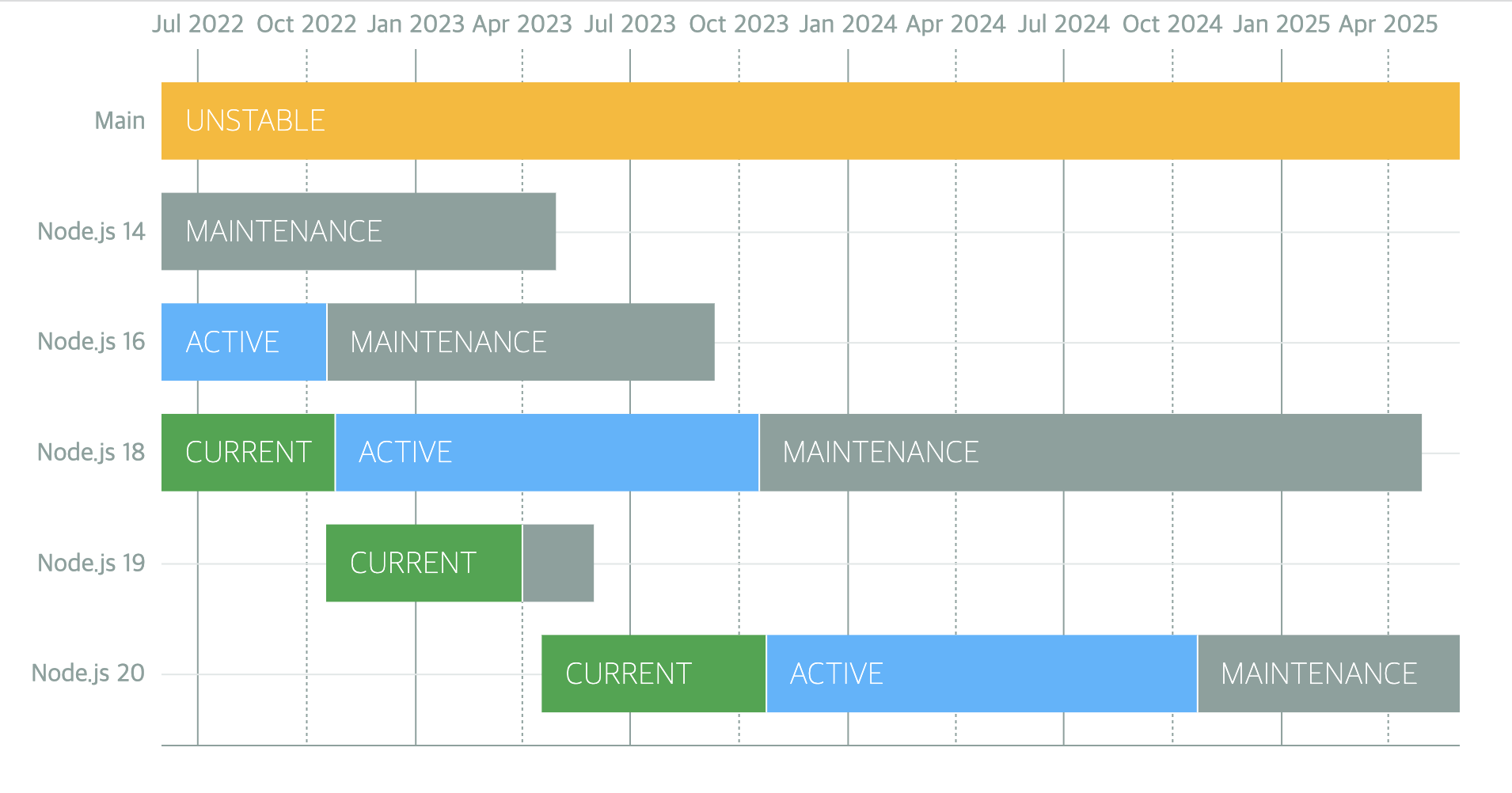
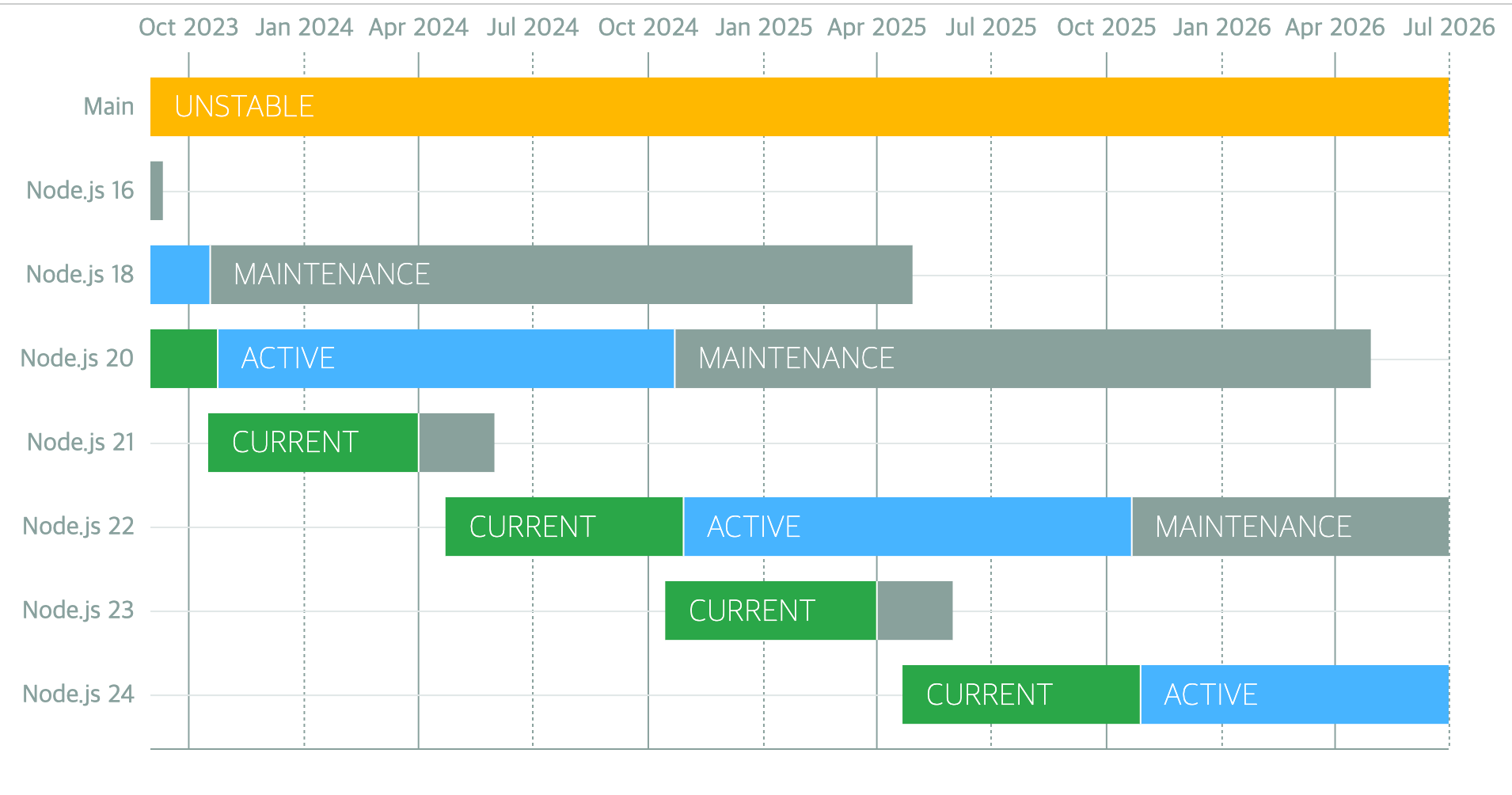
Node.js 14: 2023년 4월에 지원 종료
Node.js 16: 2023년 9월에 지원 종료
Node.js 17: 2022년 6월에 지원 종료
Node.js 18: 2025년 4월에 지원 종료
Node.js 19: 2023년 6월에 지원 종료
Node.js 20: 2026년 4월에 지원 종료
Node.js 21: 2024년 4월에 지원 종료
매해 10월에 LTS 버전 릴리즈
GitHub - nodejs/Release: Node.js Release Working Group
v16
-
ECMAScript RegExp Match Indices
const matchObj = /(Java)(Script)/d.exec('JavaScript'); undefined > matchObj.indices [ [ 0, 10 ], [ 0, 4 ], [ 4, 10 ], groups: undefined ] > matchObj.indices[0]; // Match [ 0, 10 ] > matchObj.indices[1]; // First capture group [ 0, 4 ] > matchObj.indices[2]; // Second capture group [ 4, 10 ] -
AbortController Web API에 기반한 안정적인 AbortController 구현
-
레거시 웹 플랫폼 API와의 호환성을위한 웹 플랫폼 atob(buffer.atob(data)) 및 btoa(buffer.btoa(data)) 구현
-
Node.js는 여러 플랫폼에 대해 사전 빌드된 바이너리를 제공
- Intel(darwin-x64), ARM(darwin-arm64), macOS(.pkg, .fat)
참고페이지
v17
OpenSSL 3.0
Node.js는 이제 OpenSSL 3.0을 포함하고 여기에는 QUIC을 지원하는 quictls/openssl이 포함되어 있습니다. OpenSSL 3.0에서는 새로운 FIPS 모듈을 사용해서 FIPS 지원을 다시 이용할 수 있습니다. FIPS 지원으로 Node.js를 빌드하는 자세한 방법은 BUILDING.md를 참고하세요.
OpenSSL 3.0 API는 OpenSSL 1.1.1에서 제공되는 API와 대부분 호환되어야 하지만 허용된 알고리즘과 키 크기에 관해서 제한이 강화되었기 때문에 생태계에 어느 정도의 영향은 있을 것으로 생각합니다.
Node.js 17을 사용하는 애플리케이션에서 ERR_OSSL_EVP_UNSUPPORTED 오류가 발생한다면 애플리케이션이나 사용 중인 모듈이 OpenSSL 3.0이 더는 기본적으로 허용하지 않는 알고리즘이나 키 크기를 사용할 가능성이 높습니다. 이러한 강화된 제한을 임시로 우회하는 방법으로 --openssl-legacy-provider 명령행 옵션을 사용하면 레거시 프로바이더로 되돌릴 수 있습니다.
V8 9.5
V8 JavaScript 엔진이 V8 9.5로 업데이트되었습니다. 이 릴리스는 Intl.DisplayNames API에 대한 추가적인 지원 타입과 Intl.DateTimeFormat API의 확장된 timeZoneName 옵션이 포함되어 있습니다.
V8 9.5 릴리스 글에서 자세한 내용을 볼 수 있습니다.
참고페이지
v18
-
fetch API 추가(Experimental)
- 브라우저 환경에서만 사용 가능하던 fetch API 가 실험적으로 도입되었습니다
function fetch(input: RequestInfo, init?: RequestInit): Promise<Response>; const res = await fetch('https://nodejs.org/api/documentation.json'); if (res.ok) { const data = await res.json(); console.log(data); } -
HTTP Timeouts
- http 통신의 시간제한을 밀리초 단위로 제한할 수 있습니다. 시간제한이 만료되었을 땐, 클라이언트로는 408 코드로 응답을 하게됩니다.
app.get('/*', (req, res) => { setTimeout( () => res.sendFile(path.join(__dirname, '../build', 'index.html')), 1000, ); }); -
test runner 추가(Experimental)
- 모듈을 가져와서 node:test단위 테스트를 작성하고 결과를 TAP(Test Anything Protocol) 형식으로 보고할 수 있습니다. 이는 JavaScript의 테스팅 프레임워크인 Jest 와 비슷합니다
test('top level test', async t => { await t.test('subtest 1', t => { assert.strictEqual(1, 1); }); await t.test('subtest 2', t => { assert.strictEqual(2, 2); }); }); -
V8 JavaScript engine is updated to V8 10.1
- findLast와 findLastIndex 추가(ecmascript 2023)
- class fields and private class methods 성능향상(ecmascript 2022)
참고페이지
v19
노드의 새로운 감시 모드
Node.js 19에는 지정된 파일에서 변경 사항이 감지되면 Node.js 서버를 다시 시작하는 실험적인 --watch 플래그가 도입되었습니다.
파일의 변경사항을 감지해서 Node.js 서버를 다시 시작합니다.(nodemon이 필요없어지겠네요^^)
// server.js
const express = require("express");
const app = express();
const PORT = 6060;
app.listen(PORT, () => console.log(`App listening on port: ${PORT}`));
node --watch server
기본적으로 HTTP 연결 유지
http/https 모듈의 keepAlive< 옵션은 요청이 완료된 후 서버에 대한 연결을 유지해야 하는지 여부를 제어합니다. 원래는 keepAlive를 설정해야 합니다. > 옵션을 수동으로 true로 설정합니다. 이 옵션은 서버에 연결을 열린 상태로 유지하고 후속 요청에 재사용하도록 지시합니다.
Node.js 19에서는 keepAlive 옵션이 기본적으로 true로 설정됩니다. 이렇게 추가하면 새 연결을 설정하는 데 드는 오버헤드가 크게 줄어듭니다.
WebCrypto API 안정화
WebCrypto API는 Node.js의 Web Crypto API 표준 구현입니다. Node.js 19를 사용하면 이제 Ed25519, Ed448, X25519 및 X448 알고리즘.
globalThis 모듈 또는 node:를 사용하여 이 API에 액세스할 수 있습니다. 핵심 Node.js 모듈을 타사 라이브러리와 구별하기 위해 Node.js 18에 도입된 접두사입니다.
사용자 정의 ESM 해상도 조정
Node.js 19에서는 이전의 실험적 --experimental-specifier-solution 플래그를 제거합니다. 이는 ECMAScript가 모듈을 가져오는 방법과 유사하게 패키지 지정자를 사용하여 파일을 찾는 실험적인 지원을 제공했습니다.
Node.js는 사용자 정의 로더를 사용하여 기능을 복제할 수 있기 때문에 이 플래그를 제거했습니다. 사용자 정의 로더를 사용하면 더 많은 모듈 형식을 지원하거나 모듈 로드 및 처리를 위한 고유한 논리를 제공할 수 있으므로 로드하기 전에 모듈을 추가로 처리할 수 있습니다.
DTrace/SystemTap/ETW 지원 제거
DTrace, SystemTap 및 ETW(Windows용 이벤트 추적)는 실행 중인 프로그램에 대한 동적 추적 및 분석을 제공하는 모듈입니다. 원래 Node.js에서는 이를 사용하여 성능 표시기, 오류 및 기타 가능한 런타임 발생을 포함하여 애플리케이션 활동에 대한 데이터를 수집할 수 있었습니다.
Node.js 19에서 Node.js는 DTrace, SystemTap 및 ETW에 대한 지원을 제거했습니다. 왜냐하면 이러한 모듈을 최신 상태로 유지하고 유지하는 데 수반되는 복잡성이 아직 그만한 가치가 없기 때문입니다. 따라서 리소스의 우선순위를 지정하기 위해 지원을 중단했습니다.
v20
-
안정적인 테스트 러너
- describe, it/test and hooks to structure test files
- mocking
- watch mode
- node --test for running multiple test files in parallel
import { test, mock } from 'node:test'; import assert from 'node:assert'; import fs from 'node:fs'; mock.method(fs, 'readFile', async () => 'Hello World'); test('synchronous passing test', async t => { // This test passes because it does not throw an exception. assert.strictEqual(await fs.readFile('a.txt'), 'Hello World'); }); -
V8 JavaScript engine is updated to V8 11.3
- String.prototype.isWellFormed and toWellFormed
- Methods that change Array and TypedArray by copy
- RegExp v flag with set notation + properties of strings
- Basic_Emoji
- Emoji_Keycap_Sequence
- RGI_Emoji_Modifier_Sequence
- RGI_Emoji_Flag_Sequence
- RGI_Emoji_Tag_Sequence
- RGI_Emoji_ZWJ_Sequence
- RGI_Emoji
- https://v8.dev/features/regexp-v-flag
-
performance improvement
- URL, fetch(), EventTarget 성능 개선
- URL.canParse() 및 타이머와 같은 API의 성능 개선
- V8 JavaScript 엔진이 11.3으로 업데이트 되며 성능이 개선
참고페이지
v21
V8 11.8 업데이트
-
Array grouping Note: this proposal is now at stage 4. See the spec PR here: tc39/ecma262#3176
const array = [1, 2, 3, 4, 5]; // `Object.groupBy` groups items by arbitrary key. // In this case, we're grouping by even/odd keys Object.groupBy(array, (num, index) => { return num % 2 === 0 ? 'even' : 'odd'; }); // => { odd: [1, 3, 5], even: [2, 4] } // `Map.groupBy` returns items in a Map, and is useful for grouping // using an object key. const odd = { odd: true }; const even = { even: true }; Map.groupBy(array, (num, index) => { return num % 2 === 0 ? even : odd; }); // => Map { {odd: true}: [1, 3, 5], {even: true}: [2, 4] } -
ArrayBuffer.prototype.transfer Stage: 3 현재 버퍼(buffer)와 동일한 바이트(byte) 데이터를 가진 새로운 ArrayBuffer를 생성한 후 출처 ArrayBuffer를 분리한다.
const arrBuffer = new ArrayBuffer(16, { maxByteLength: 32 });
const uint16view = new Uint16Array(arrBuffer);
uint16view[2] = 15;

const arrBuffer2 = arrBuffer.transfer();
console.log(arrBuffer.detached);
console.log(arrBuffer2.resizable);

const uint16view2 = new Uint16Array(arrBuffer2);
console.log(uint16view2[2]);

/**
[boolean]true
[boolean]true
[number]15
*/
ArrayBuffer: 레퍼런스 타입으로 되어있고, 고정된 길이의 연속된 메모리 공간을 할당해 사용하겠다고 알려주는 역할을 한다
let arrBuffer = new ArrayBuffer(16); // 이렇게 생성하면 연속된 16바이트만큼의 메모리 공간을 버퍼로 할당해 사용하겠다고 선언하는 것과 같다.
// ArrayBuffer의 공간 안에 있는 내용을 조작하려면, 특수한 "view"역할을 하는 객체들을 사용해야한다.
// (이것을 TypedArray라고 부른다)

var view = null;
view = new Uint32Array(buffer); // 4바이트(32비트) 꼴로 버퍼에 있는 내용 읽어들일게요

// Uint8Array = 매 바이트(8비트) 마다 독자적인 정수로 읽어들여 다루겠다는 의미이다
// Uint16Array = 매 2바이트(16비트) 마다 독자적인 정수로 읽어들여 다루겠다는 의미이다.
// Uint32Array = 매 4바이트(32비트) 마다...
// Float64Array = 매 8바이트 (64비트) 마다 float값으로 읽어들여 다루겠다는 의미로, 가능값에 소숫점 이하가 포함될 수 있음을 의미한다.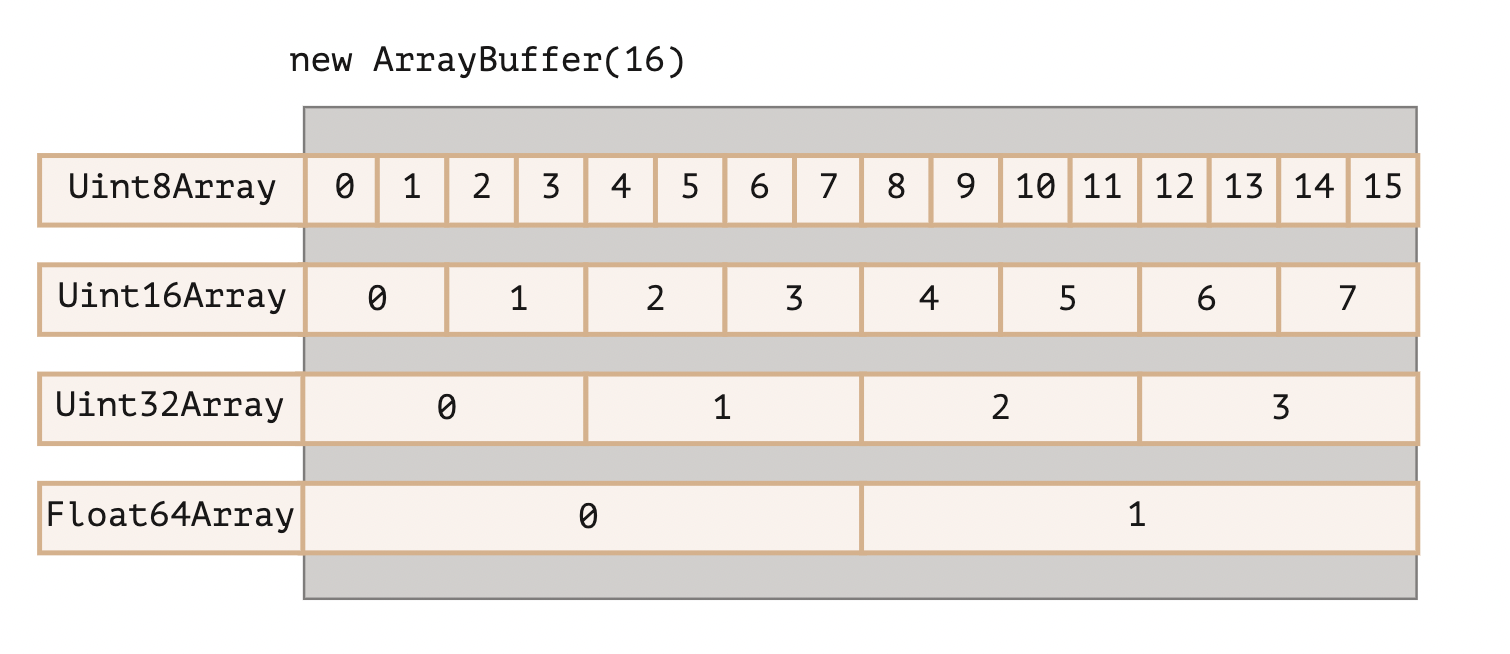
-
WebAssembly extended-const expressions 새로운 형식의 상수 표현식 추가 https://github.com/WebAssembly/extended-const/tree/main/proposals/extended-const
i32.add
i32.sub
i32.mul
i64.add
i64.sub
i64.mul
Node.js test runner의 glob 문법 지원
최신 Node.js 업데이트를 통해 테스트 러너에는 --test 매개변수를 지정해서 glob 표현식을 지원한다.
golb패턴을 사용하여 테스트를 보다 효율적이고 유연하게 실행할 수 있다.
예를들어 node --test */.test.ts 와 같은 명령을 사용해서 여러 디렉토리에 있는 모든 .test.ts 확장자 파일을 실행할 수 있다.
HTTP
cork 응답과 관계없이 .write 호출마다 별도의 청크를 생성했지만, 버전이 업그레이드가 되면서 cork 응답 호출에 대해서 단일 청크로 생성해서 성능을 개선
res.cork(); // 데이터를 버퍼에 강제 저장
res.write('Mozilla');
res.write(' Developer Network');
res.uncork(); // 데이터를 버퍼에서 해제(flush)

// 개선 전
HTTP/1.1 200 OK
Content-Type: text/plain
Transfer-Encoding: chunked

7\r\n
Mozilla\r\n
18\r\n
Developer Network\r\n
0\r\n
\r\n

// 개선 후(단일 청크로 결합)
HTTP/1.1 200 OK
Content-Type: text/plain
Transfer-Encoding: chunked

25\r\n
Mozilla Developer Network\r\n
0\r\n
\r\n- fetch module 과 WebStreams modules 최근 업데이트로 안정화 되었습니다.
- 이번 업데이트로 인해서 WebStreams, FormData, Headers, Request, Response, and fetch 메서드에 영향을 끼치게 됩니다.
Add flush option to fs.writeFile function
- flush 옵션 설정 시 파일 쓰기 작업 완료 후 버퍼에서 데이터가 제거됩니다.
참고페이지